Stop digging for files
Just ask for them
Filex reads, renames and files every document — so anything you need is one question away.Filex AI reads, renames and files every document for you — so the receipt, contract or passport scan you need is always one question away. On iPhone, Android and the web.
The problem
Your files are everywhere
except where you need them.
Incoming call
Sarah Cole
Landlord · 14 Elm Street
No results
Your landlord calls about the deposit.
The signed lease is a photo somewhere in your camera roll.
p. 4
Renews automatically on Jan 15, 2027
policy_document_final.pdf
Page 1 of 9
The renewal date is on page 4.
It’s in an insurance policy you never read past the first page.
Your accountant
Can you send all your receipts and statements for the year?
Downloads
receipt (2).pdf
IMG_4821.jpg
statement_final.pdf
Tax time, and you need every receipt.
They’re split across email, Downloads and your phone.
Miss a renewal and you pay for another year.
Lose a receipt and you lose the deduction.
The assistant
One question.
Any document.
Sort, find and answer questions across every document you own. Pick a request to watch Filex do it.

Filex AI
/ Uploads
Ask anything about your uploads.
Answers come with the document they came from.
Ask about Uploads
How it works
Never hunt for a file
again, in 3 steps.
No folders to build. No rules to learn.
Add your files
Upload from your phone, computer or cloud drive — or scan a paper document with your camera.
Filex files them
It reads every file, gives it a clear name and puts it where it belongs. Want it your way? Just say "sort by client, then month."
Ask for anything
"Find my car insurance." "What's due this week?" You get the answer and the exact file in seconds.
What you get
Every group, person and deadline,
handled for you.
Pull together what a task needs, see everything about one person in a tap, and hear about renewals before they cost you.
Every document linked to the people in it.
Filex reads the names and addresses on every letter, lease and bill and links the file to them. Tap a person to see every document they appear in.
Residential Lease Agreement
- Property: 14 Elm Street
- Landlord: Sarah Cole
- Managed by: Cole Realty
- Contact: Tom Reid
Found on page 1: “Landlord: Sarah Cole”
Everything for one part of your life, gathered for you.
Ask for “Tax 2026” or “Rome trip” and Filex pulls every matching document into one group. New files join as they arrive, and one file can sit in several groups without being copied.
Describe a group…
Renewals find you before they cost you
Expiry dates, renewal dates and due dates are read straight from your documents. Filex reminds you ahead of time, with the document one tap away.
Coming up
- 12NovElectricity bill$96in 4 days
- 15JanCar insuranceRenewsin 68 days
- 1FebLease — 14 Elm StreetEndsin 85 days
- 2,AugPassportExpiresin 1028 days
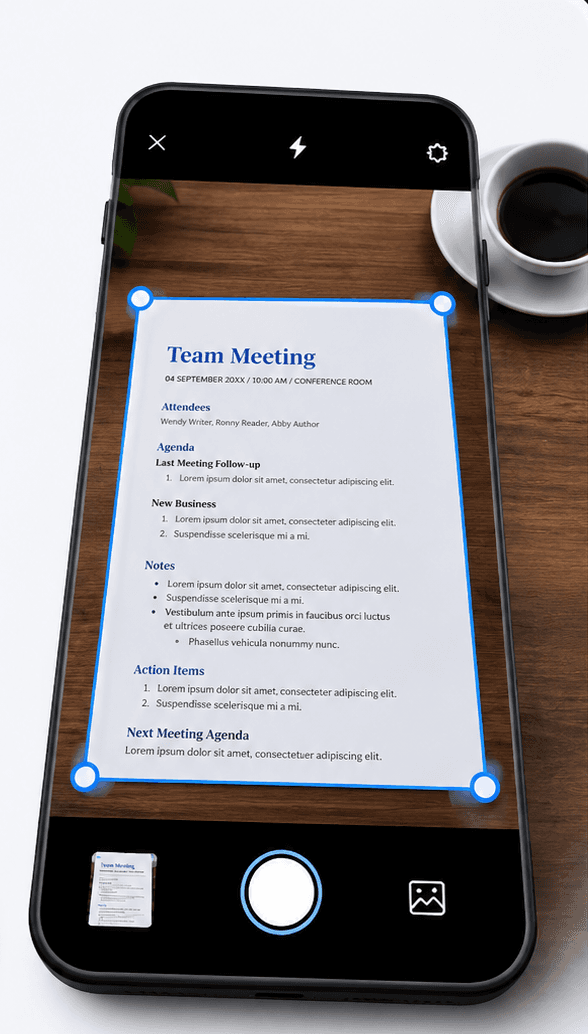
Document Scanner
Scan it. Filex AI organizes and finds it.
Point your camera at any document — a passport, a lease, a receipt, a signed contract. Filex AI reads it, names it clearly, files it into the right folder, and makes it searchable in seconds.
- 01
Tap scan and point your camera
Open Filex AI, tap scan, and point your camera at any document. Then tap organize. That is the whole job.
- 02
AI reads the document
OCR and content analysis extract what the document actually is: the type, the people and places in it, the dates, the amounts.
- 03
It files itself
The scan lands in the folder that fits it — or Filex AI creates one. It gets a clear name built from its content, not "Scan_20260714.pdf".
- 04
Find it by asking
Weeks later, just type "find Luis's passport" or "show the signed lease for Baker Street". The scan is already indexed, named, and linked.
Works with your AI assistant
Use Filex AI from ChatGPT, Claude or any AI assistant
Connect your files once, then ask your assistant to find, read and organize them for you.
- ChatGPT
- Claude
- Gemini
- Grok
- + any AI assistant
You ask ChatGPT
ChatGPT searched your files
Car_Insurance_Policy_2026.pdf
Insurance / Auto
Car_Insurance_Renewal.pdf
Insurance / Auto
Browser Extension
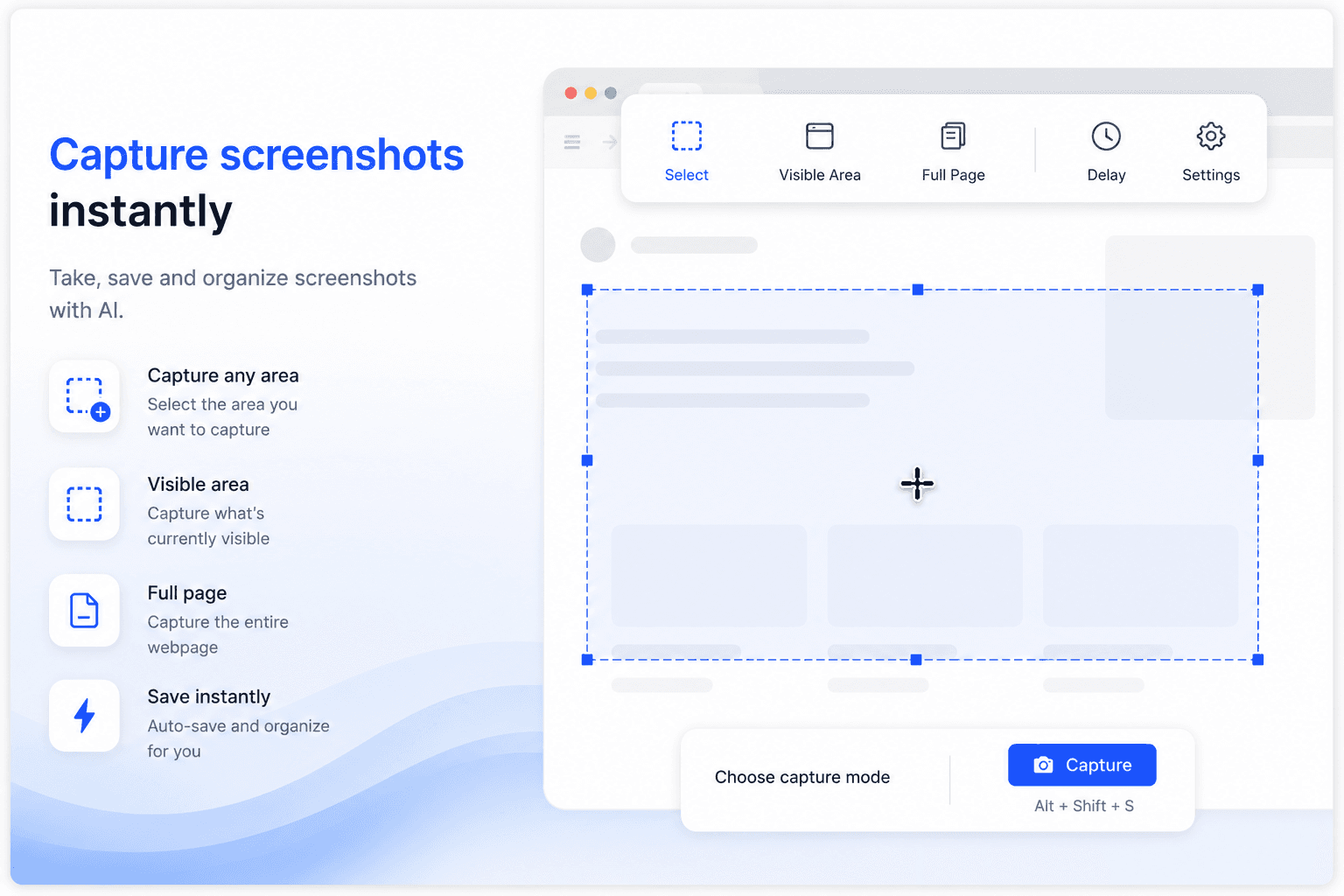
Capture screenshots, organize downloads — right inside Chrome
Take, save, and organize screenshots with AI. Every screenshot you capture and every file you download gets named, sorted, and synced automatically — without leaving the tab.
- Capture any area, the visible area, or a full page
- Screenshots auto-saved, named, and organized with AI
- Downloads sorted into the right folder automatically
- Full-content search inside screenshots and files
- Instant sync to Filex AI on iPhone, Android, and web
We know the feeling. So do they.
Filex AI started with a phone full of IMG_4821 photos we could never find again. Now thousands of people use it to find any file in seconds.
Reddit user
I’m a property agent and deal with floor plans, contracts, and client documents every day. This made my files much easier to manage without manual sorting.
X user
X
As a property agent, I’m constantly downloading agreements and brochures. Finding things quickly before client calls is way less stressful now.
Reddit user
I’m a software developer and my Downloads folder was chaos—screenshots, logs, random PDFs. This organized everything better than I expected.
X user
X
I work in marketing and download a lot of decks and reports. This saved me during meetings when I needed files fast.
Reddit user
I’m a college student and my notes and PDFs were always scattered. This helped me clean things up without thinking too much.
X user
X
I was a bit worried about privacy at first, but it feels safe. I mostly use it for work documents and research files.
Available Everywhere
Your files, wherever you are
iPhone & iPad App
Scan documents, organize files, and search by content on the go. Available on iOS and iPadOS.
Get the appAndroid App
Scan documents, organize files, and search by content on the go. Available on Android.
Get the appWeb App
Full-featured workspace in your browser. Organize, search, share, and manage files from anywhere.
Try Filex freeBrowser Extension
AI file management directly inside Google Drive, OneDrive, and Dropbox. No tab switching.
Add to ChromeYour files stay yours
Encrypted, private, and never used to train AI. Ever.
Encrypted by Default
All files and related metadata are encrypted both in transit and at rest using industry-standard encryption methods.
GDPR-Compliant Architecture
Designed in line with GDPR principles including data minimisation, purpose limitation, and user-controlled access.
Limited Processing Scope
Files are processed only during the organisation workflow. Once organisation is completed, files are no longer accessed or processed.
User-Only Data Access
Only you can access your files. We do not sell user data, and files are never used for model training or secondary purposes.
Secure Cloud Infrastructure
Data is stored on hardened cloud infrastructure with strict access controls, auditing, and continuous monitoring.
Security Best Practices
Security controls follow least-privilege access, secure key management, and proactive risk mitigation practices.
Start free. Upgrade when you’re hooked.
No credit card to start. Cancel anytime.
Free
Start organizing smarter with AI-powered file management.
- 10 files one time
- AI content analysis & auto-sorting
- Smart file renaming
- Basic tagging
- Cloud sync across devices
- Export Organized Folders
Premium (Yearly)
Save more with annual billing
Billed $44.99 once a year
- 6000 files organization per year
- Advanced subject-based folders
- OCR for images & scans
- Handwritten notes analysis
- Mobile app access
- Share-to-organize from anywhere
- Priority support
- Export Organized Folders
Premium
Ideal for professionals who organise files, notes, and projects every day.
- 500 files organization per month
- Advanced subject-based folders
- OCR for images & scans
- Handwritten notes analysis
- Mobile app access
- Share-to-organize from anywhere
- Priority support
- Export Organized Folders
Frequently asked questions
Everything you need to know about using Filex AI
Is Filex AI free to use?
You can start free. Every new account gets 10 files organized free, one time, with no payment details required. After that, Pro is $7.99 a month for 500 files, or $44.99 a year for 6,000.
Can I use the Filex app on my computer?
Yes. Open Filex AI in any browser on Mac, Windows or Chromebook, then select or drag in your files. Filex AI sorts them into folders, and you can download the sorted folders as a zip. The Filex app for iPhone and Android syncs with the same library.
Where are my files stored?
Your files are securely stored on Cloudflare’s encrypted cloud storage infrastructure. This allows your files to sync seamlessly between your mobile and web devices while staying protected.
Are my files encrypted and private?
Yes. Your files are encrypted during transfer and while stored. Only you can access your data, and we never sell, share, or use your files for advertising or training purposes.
Will Filex AI rename or move the files on my phone?
No. Renaming and filing happen inside Filex AI only. The copy you upload gets a clear name and lands in the right folder in Filex, while the original files on your phone or computer stay exactly where they are, with their original names.
Can I access my files on both mobile and web?
Yes. Files uploaded from your phone instantly sync and become available on the web, and vice versa. You can access your organized files from any device.
How does Filex AI organize my files?
Filex AI analyzes file content and context to automatically group files into meaningful folders like subjects, projects, or categories — even if your files have unclear or messy names.
What happens when I reach my free limit?
Once you reach the Free plan limit, you won’t be able to upload new files until you upgrade or receive additional credits. Your existing files will always remain accessible.
Can I delete my data completely?
Yes. You can delete your files and data at any time. Once deleted, your data is permanently removed from our systems.
Is Filex AI safe to use for personal or study files?
Absolutely. Filex AI is built with privacy-first principles and secure infrastructure, making it safe for personal documents, study materials, and everyday files.
Solutions
AI file organization for your use case
Purpose-built workflows with tailored folder structures, extraction, and search.