AI File & Document Management

AI Image Organizer
For Everyone

Automatically organize photos, receipts, product shots, and scanned documents by visual content and date. Stop scrolling endlessly β€” let AI do it for you.

No credit card required Β· Free plan included

|
10+
hours saved monthly on manual filing
3 sec
to find any file with AI search
100%
of files organized automatically

Image chaos is burying your most important files
β€” manually sorting photos and scans is a thing of the past.

From product photos to receipt scans, Filex AI reads inside every image so you can find exactly what you need in seconds.

2.5 hours

wasted daily searching & organizing files

File Chaos

60%

of work context is lost in scattered files

Lost Context

73%

of teams struggle with inconsistent file names

Naming Confusion

How to Tame Your Image Library

Three simple steps to a perfectly indexed and searchable image collection.

01

Upload Your Files

Drop files, folders, or entire workspaces β€” PDFs, images, docs, anything messy.

02

Tell AI What You Want

Use plain English like β€œorganize by project” or β€œgroup by client & date.”

03

AI Organizes Instantly

Files are renamed, categorized, and structured automatically β€” no rules needed.

04

Find Anything Fast

Search using natural language and access any file in seconds.

AI organization for Images

Tailored structure and intelligent filing designed specifically for images workflows.

✨

Organize your image library intelligently

Automatically organize photos, receipts, scanned documents, product shots, and screenshots with intelligent visual content-aware categorization.

Custom Organization Logic

1

Sort by content type, then subject, then date

  • Visual content and subject detection
  • OCR extracts text from photos and scans
  • Automatic date and location extraction

Natural Language Search

"Find my receipt photo from last week"

FILE

unorganized_file.pdf

Unorganized

Receipts/2026/May/Coffee_Shop_Receipt_May_14.jpg

Organized by Filex AI

The Smart Image Organizer Toolkit

Everything you need to organize, search, and manage your entire image library.

Key Feature
πŸ–ΌοΈ

Built Specifically for Images

Automatically detects visual content β€” receipts, IDs, product shots, creative assets β€” and organizes them by subject, type, and date.

Key Feature
🧠

OCR Reads Text Inside Images

Advanced AI extracts text from photos of receipts, documents, whiteboards, and signs β€” making every image fully searchable by its content.

🏷️

Intelligent File Renaming

Say goodbye to "IMG_9842.JPG". AI generates clear, descriptive names based on what is actually visible inside the image.

πŸ”

Search by What You See

Find any image instantly by describing what is in it. Search for a merchant name, a product, a person, or any text visible in the photo.

πŸ”’

Privacy-First Design

Your personal photos, ID scans, and sensitive documents are encrypted and completely private. Only you can access your images.

πŸ“±

Access Anywhere, View Everywhere

Sync your organized images across all devices. Browse on your phone, manage on your laptop, access everything in the cloud.

Auto Organization

Drag in photos. Filex AI files them by what they show.

Drop in receipts, product shots, and scanned documents, tell Filex AI how you want them grouped, and let AI understand, rename, and organize them instantly. It reads visual content β€” not just filenames β€” and follows your custom rule every time.

Understands file content, not just filenames
Learns your patterns over time
Smart renaming
Nested folder structures
Custom organization rules in plain English
Works with scanned documents
2.5 hrs
saved per day
50+
file formats
iOS & Android
mobile apps
Learn More

Custom organization rule

β€œGroup images by content type, then by subject and date”
Receipts & InvoicesProduct PhotosDocuments & IDs
  • πŸ“„IMG_9842.JPGReceipts & Invoices/Blue_Bottle_Coffee_Receipt_May14_2026.jpg
  • πŸ“„scan_143052.jpgDocuments & IDs/Passport_Scan_John_Smith.jpg
  • πŸ“„photo_2026-05-14.jpgProduct Photos/Product_Shot_Red_Sneaker_Front_View.jpg
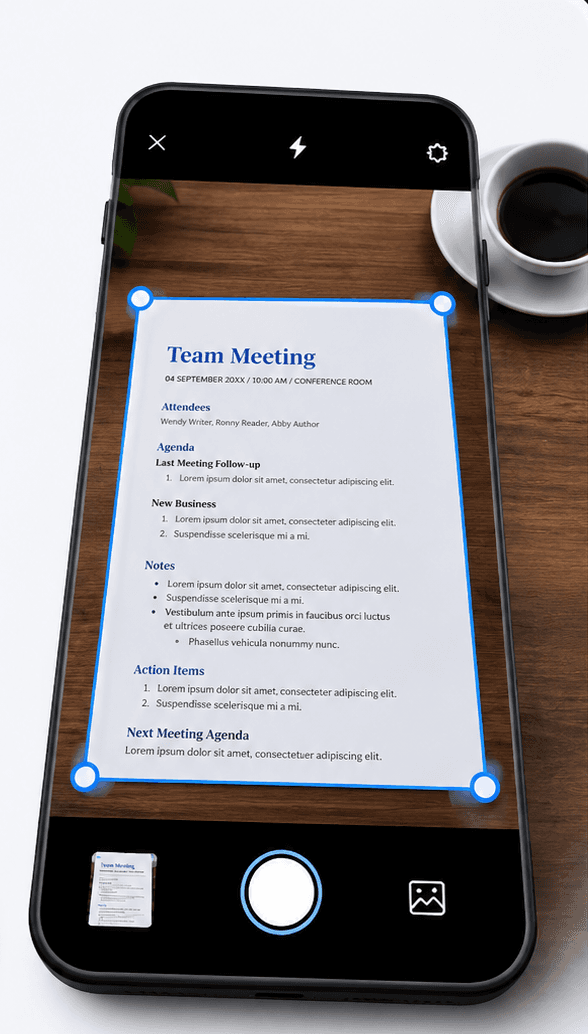
Filex AI document scanner scanning and organizing a document on mobile

Document Scanner

Scan it. Filex AI files it under the right category.

Point your camera at a receipt, an ID, or a product. Filex AI reads it, names it clearly, and files it under the right category β€” no manual sorting through a camera roll of "IMG_9842.JPG" files.

  1. 01

    Tap scan and point your camera

    Open Filex AI, tap scan, and point your camera at any receipt, document, or object. Then tap organize. That is the whole job.

  2. 02

    AI reads the image

    Visual recognition and OCR extract what the image actually shows: a merchant name, a product, a document type, any visible text.

  3. 03

    It files itself

    The image lands in the category folder that fits it β€” or Filex AI creates one. It gets a clear name built from its content, not "Untitled.png".

  4. 04

    Find it by asking

    Weeks later, just type "find Blue Bottle Coffee receipt". The image is already indexed, named, and linked.

Browser Extension

Capture screenshots and product images β€” right inside Chrome

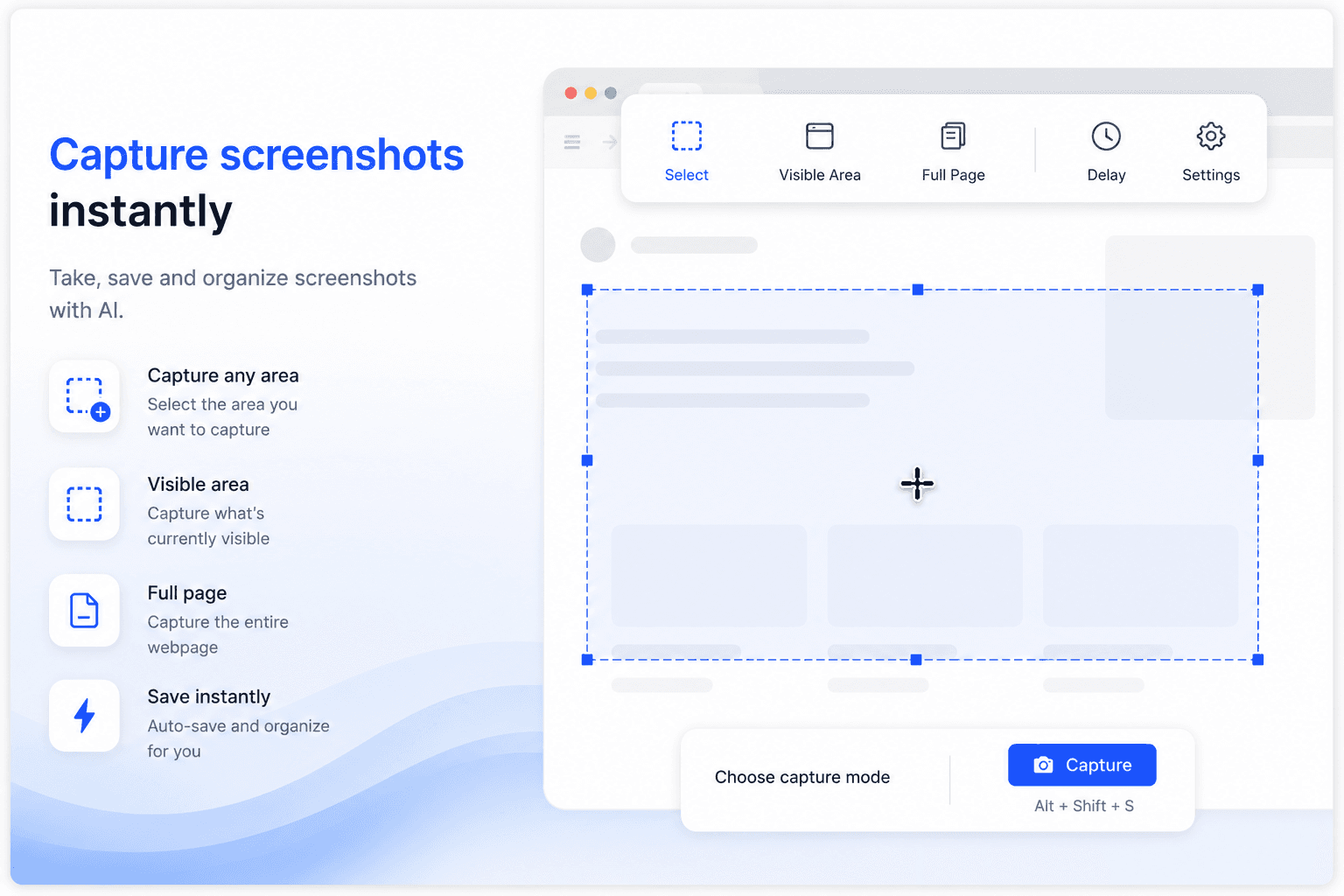
Take, save, and organize screenshots and downloaded images with AI. Every screenshot you capture and every file you download gets named, sorted by content, and synced automatically β€” without leaving the tab.

  • Capture any area, the visible area, or a full page
  • Screenshots auto-saved, named, and filed by what they show
  • Downloads sorted into the right category folder automatically
  • Full visual and text search inside every image
  • Instant sync to Filex AI on iPhone, Android, and web
Filex AI browser extension capturing and organizing a screenshot

Smart Grouping & Lenses

Group your images, your way

Describe a group once β€” Filex AI keeps it live and up to date automatically.

β€œGroup all receipt and invoice photos”

β€œGroup product photos by shoot date”

β€œCreate a Lens for this month's expense receipts”

β€œGroup documents and IDs by type”

β€œGroup all creative reference images”

β€œCreate a Lens for duplicate photos to clean up”

β€œGroup screenshots by content”

β€œCreate a Lens for images with text I can search”

Available Everywhere

AI Image Organizer β€” iPhone & Android

iPhone & iPad App

Scan documents, organize files, and search by content on the go. Available on iOS and iPadOS.

Get the app

Android App

Scan documents, organize files, and search by content on the go. Available on Android.

Get the app

Web App

Full-featured workspace in your browser. Organize, search, share, and manage files from anywhere.

Get started

Browser Extension

AI file management directly inside Google Drive, OneDrive, and Dropbox. No tab switching.

Add to Chrome

Simple, transparent pricing

Start free. Upgrade only when you need more power.

Free

Start organizing smarter with AI-powered file management.

$0
  • 20 files one time
  • AI content analysis & auto-sorting
  • Smart file renaming
  • Basic tagging
  • Cloud sync across devices
  • Export Organized Folders
Most Popular

Premium

Ideal for professionals who organise files, notes, and projects every day.

$2.99/month
  • 500 files organization per month
  • Advanced subject-based folders
  • OCR for images & scans
  • Handwritten notes analysis
  • Mobile app access
  • Share-to-organize from anywhere
  • Priority support
  • Export Organized Folders
Best Value

Premium (Yearly)

Save more with annual billing

$29/year
  • 6000 files organization per year
  • Advanced subject-based folders
  • OCR for images & scans
  • Handwritten notes analysis
  • Mobile app access
  • Share-to-organize from anywhere
  • Priority support
  • Export Organized Folders

What People Are Saying

Join thousands who've revolutionized their file management

πŸ”΄Reddit
Found a receipt photo from 3 months ago in seconds during an expense audit. My image folder went from total chaos to perfectly organized categories.
E
via Reddit
🐦X
βœ“ Verified
Organized 2,000+ product photos in under 15 minutes. Every image is now named after the product and filed by shoot date. Incredible.
E
via X
πŸ”΄Reddit
The OCR on receipt photos is insane. It reads the merchant name and total from the image and names the file accordingly. No more "IMG_9842.JPG".
F
via Reddit
🐦X
βœ“ Verified
Searched 'blue bottle coffee receipt may' and it found exactly the right photo in under a second. That's the kind of AI I actually want.
P
via X
πŸ”΄Reddit
All my passport scans, insurance documents, and ID photos are finally in one secure, organized place. Found my visa copy in 5 seconds.
D
via Reddit
πŸ”΄Reddit
As a designer I save hundreds of reference images. Now I can search "minimal blue UI" and get exactly the screenshots I saved months ago.
U
via Reddit

Complete guide

The Complete Guide to AI File Management for Images

Why a Camera Roll Becomes Unsearchable Fast

A handful of important photos are easy to keep track of by scrolling. That stops working once a camera roll or downloads folder holds thousands of images with names like "IMG_9842.JPG" and "photo.jpg" that a camera or phone auto-generated, describing nothing about what the image actually shows. Every image looks identical in a file browser until it's opened individually.

The real cost shows up when a specific image is actually needed, an expense receipt during a reimbursement deadline, an ID scan for a form, and scrolling through thousands of visually similar thumbnails becomes the only available strategy. A camera roll built on the assumption that images will somehow stay findable by date alone rarely survives past a few hundred photos.

AI-based organization removes the dependency on filenames or manual tagging. Because Filex AI reads the actual visual content and any embedded text in each image, the two-thousandth screenshot in a backlog gets categorized with the same accuracy as the first, regardless of what a camera happened to name it.

How AI Understands What an Image Actually Shows

A file named "image (3).png" gives no information about its content, and a filename-based system has no way to categorize it correctly. Filex AI instead combines visual recognition with OCR, reading both what's depicted in an image, a receipt, a product, a document, and any text visible within it, a merchant name, a total, a passport number, to determine both what kind of image it is and how it should be filed.

This matters because the categories that matter most, receipts, product photos, ID scans, look completely different from a purely visual standpoint but require the same categorization logic: understanding actual content rather than trusting a filename or a folder someone happened to drop the image into. Content-based categorization reads an image the same way a person would if they glanced at it, then files it accordingly.

Because this does not depend on filenames, it works identically well on a photo taken by a phone camera with an auto-generated name and a screenshot saved with a generic system filename. The signal was always visible in the image itself, never in how it happened to be named.

Turning a Years-Deep Photo Backlog Into a Searchable Library

Camera rolls and download folders accumulate images constantly and rarely get organized as they arrive, because pausing to categorize a photo in the moment defeats the purpose of quickly capturing it. The result, after enough time passes, is a folder with thousands of images and no reliable way to find a specific one beyond scrolling and hoping something looks familiar.

Filex AI processes an entire backlog the same way it processes a single new photo: upload everything as it exists today, with no pre-sorting required, and every image gets read and categorized in a single pass. This applies to a photo from years ago just as well as one taken this morning, since each is evaluated on its own visual content rather than its position in the camera roll timeline.

This matters most for a specific, common frustration: needing a receipt or document photo from months ago for an expense report or an official form, and not remembering exactly when it was taken. A searchable image library turns that into a quick text search instead of an exercise in scrolling through a chronological timeline hoping to spot something familiar.

  • Upload a full camera roll or downloads backlog in one pass, no pre-sorting needed
  • Every image is read for visual content and any embedded text
  • Images are grouped by content type automatically, regardless of filename
  • Receipts and documents become searchable by merchant, amount, or date

Searching Inside Images and Working Across Devices

Most of the useful information inside an image, a receipt total, an ID number, a sign's text, isn't visible in a filename or a folder structure at all; it's embedded in the picture itself. Traditional file browsers have no way to search that content, which means a folder of receipt photos is effectively unsearchable no matter how well organized the folders look.

Filex AI's OCR reads that embedded text directly, extracting a merchant name and total from a receipt photo or an ID number from a scanned document, and makes it searchable in plain language. Combined with real-time sync across web, iPhone, and Android, this means a receipt photographed on a phone during a business trip is immediately searchable from a laptop back at the office, without any manual transfer or renaming step in between.

Guides & resources

Learn more from the Filex AI blog

How to Organize Thousands of Images Without Creating Folders (AI Guide)
Photo Organization7 min read

How to Organize Thousands of Images Without Creating Folders (AI Guide)

Drowning in a sea of IMG_9482.jpg files? Learn how to organize thousands of images without creating a single folder using AI semantic search and dynamic lenses.

Jun 26
Traditional Photo Organization vs. AI Photo Organization: Stop the Endless Scroll
Photo Organization7 min read

Traditional Photo Organization vs. AI Photo Organization: Stop the Endless Scroll

Compare traditional photo organization with AI photo organization and learn how Filex AI helps you sort, search, and retrieve receipts, screenshots, documents, and utility photos instantly.

Jun 1
How to Organize Thousands of Photos Automatically: The Ultimate Guide for 2026
Photo Organization12 min read

How to Organize Thousands of Photos Automatically: The Ultimate Guide for 2026

Learn how to organize thousands of photos automatically using AI, OCR, computer vision, natural language search, duplicate cleanup, AI Lenses, and Filex AI.

Jun 1
How to Find Any Photo in Seconds Using AI Search
Photo Organization9 min read

How to Find Any Photo in Seconds Using AI Search

Filex AI finds any photo in seconds using OCR and natural language search, matching receipts, screenshots, boarding passes, and visual notes by content β€” here's how AI photo search actually works.

Jun 1
Screenshot Management using AI: The Complete Guide for Automatic Organization in 2026
Photo Organization10 min read

Screenshot Management using AI: The Complete Guide for Automatic Organization in 2026

Learn how AI screenshot management uses OCR, computer vision, natural language search, smart categories, and Filex AI Lenses to organize and find screenshots instantly.

Jun 1
How to Organize WhatsApp Screenshots Automatically in 2026
Screenshot Organization11 min read

How to Organize WhatsApp Screenshots Automatically in 2026

Learn how to organize WhatsApp screenshots automatically using OCR, AI categorization, natural language search, smart reminders, AI Lenses, cross-device sync, and Filex AI.

Jun 1

Frequently asked questions

Everything you need to know about using Filex AI

Is Filex AI free for image organization?

Yes! You get free credits to organize up to 20 files per month. Premium plans are available for unlimited image organization.

Which image formats does it support?

Filex AI supports JPG, JPEG, PNG, HEIC, WebP, TIFF, and more. The AI reads visual content and any embedded text across all common image formats.

Can it read text inside photos of receipts and documents?

Yes. Filex AI uses advanced OCR to extract text from photos of receipts, invoices, ID cards, certificates, and any image that contains readable text.

Is my personal photo data private and secure?

Your privacy is our priority. All images are encrypted end-to-end β€” only you can access your photos. We never share or sell your data, and we never use your images to train public AI models.

Does it rename my original image files?

No, your original files remain completely untouched. Filex AI creates an organized view with better names, but your originals stay exactly as they are.

Can I access my organized images on mobile?

Yes! Images sync automatically across all your devices β€” phone, tablet, laptop, or any web browser.

How accurate is the AI at identifying image content?

Our AI achieves 95%+ accuracy in identifying and categorizing image content. It combines visual recognition with OCR text extraction. You can always manually adjust if needed.

Can I delete my image data permanently?

Absolutely. Delete individual images, entire folders, or your whole account at any time. All data is immediately and permanently erased.

Does it work for RAW photography files?

Filex AI currently supports standard image formats including JPG, PNG, HEIC, and WebP. RAW format support (CR2, NEF, ARW) is on the roadmap.

Ready to Organize Your Images?

Join thousands of professionals, creators, and businesses who have transformed their chaotic image folders into an organized, searchable visual library.