AI file management.
For every file.AI file & document management
for every file you own
Filex AI reads, sorts, renames and finds your files for you.Filex AI reads your documents, sorts them into smart folders, renames them clearly, and finds anything with natural language search, on web, iPhone and Android.
See it in action
Drop in a mess.
Get folders that make sense.
The basics
What is AI file management?
AI file management is software that reads the content of your files and organizes them for you. Traditional file management makes you do the work: create folders, name files, remember where everything lives. AI file management flips that — the software understands what each document is and does the filing, renaming, and finding automatically.
Automatic organization
AI reads the content of every file and groups it into meaningful folders by client, property, case, project, or category, without you creating a single folder.
Smart renaming
Cryptic names like "scan_0231.pdf" become clear, consistent names built from the dates, people, and document types found inside the file.
Natural language search
Ask for files the way you would ask a colleague, like "find the signed lease for Baker Street", and get the exact document in seconds.
Data extraction
Names, amounts, addresses, and deadlines are extracted automatically, turning your file storage into a structured, searchable knowledge base.
Before and after
From cryptic filenames to a structure that builds itself
Filex AI reads the content of every file — document type, dates, names, amounts — and turns a junk drawer into a filing system.
Before
- 📄scan_0231.pdf
- 📄Document (4).pdf
- 📄IMG_2210.jpg
- 📄invoice-final-FINAL.pdf
- 📄Untitled.pdf
- 📄WhatsApp Document 2026-05-02.pdf
After: organized by Filex AI
📝 Contracts
- Signed › 2026-03_Vendor-Agreement-Signed.pdf
- Leases › 2026-03_Baker-Street-Lease.pdf
🧾 Bills & Receipts
- Utilities › 2026-03_Electricity-Bill.pdf
- Shopping › 2026-03_Amazon-Invoice.pdf
How it works
Organized in three steps
From your messiest folder to a searchable library in minutes.
Add your files
Upload a folder on the web or connect the iPhone and Android apps. Start with your messiest folder — that is where the difference shows fastest.
AI reads and organizes
Filex AI reads each document with OCR and content analysis, extracts dates, names, and document types, then renames and files everything into smart folders.
Find anything instantly
Search in plain English on web, iPhone, or Android. Everything stays in sync, so a file organized on one device is available everywhere.
Natural language search
Just ask, in plain English
No filenames to remember, no folders to dig through. Describe the file and Filex AI finds it.
“Find the signed lease for Baker Street”
“Show all invoices from March”
“Which files are boarding passes?”
“Find my passport scan”
“Show every receipt over $100”
“Find the contract with ABC Supplies”
“Which bills are due this week?”
“Show screenshots with confirmation codes”
Browser Extension
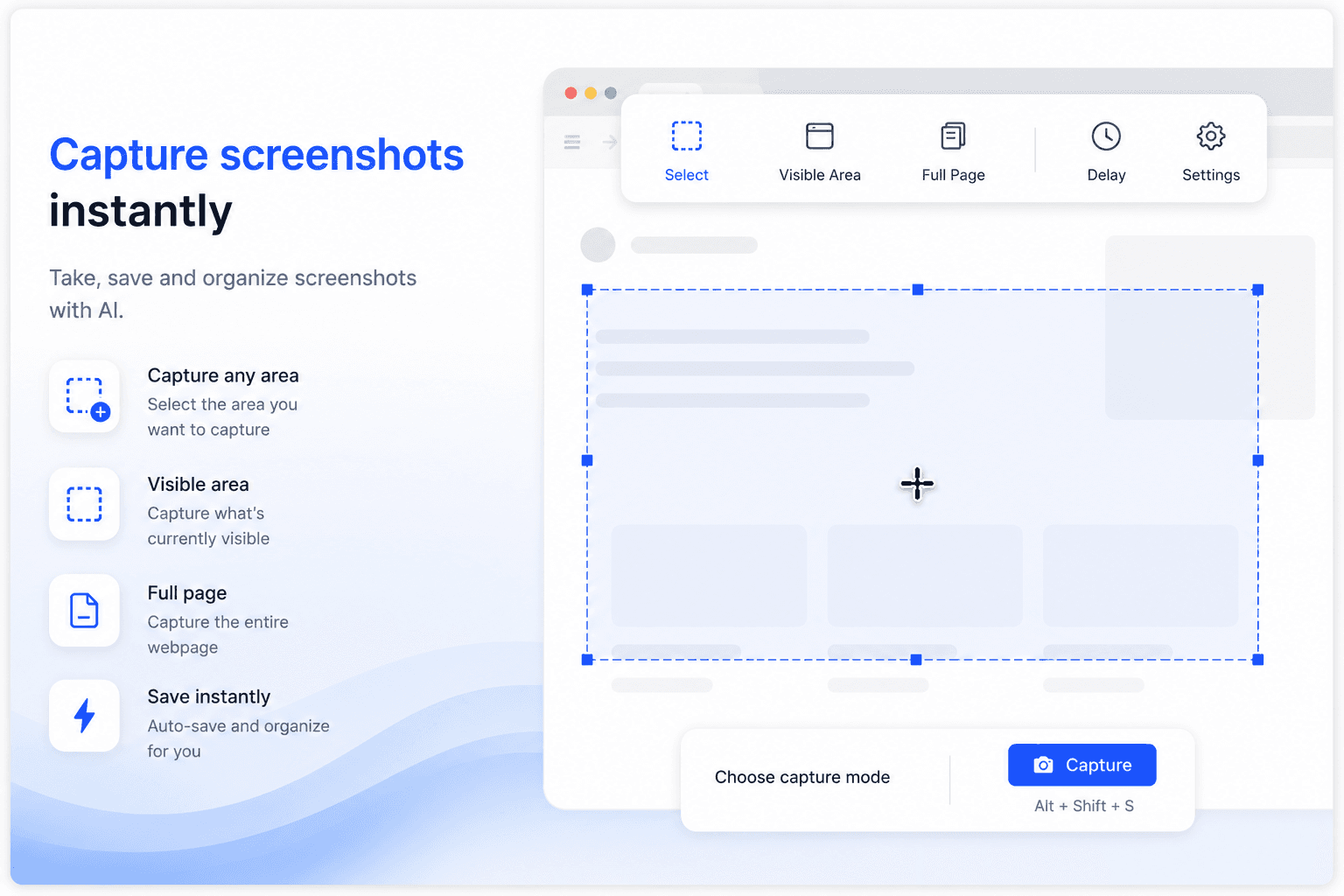
Capture screenshots, organize downloads — right inside Chrome
Take, save, and organize screenshots with AI. Every screenshot you capture and every file you download gets named, sorted, and synced automatically — without leaving the tab.
- Capture any area, the visible area, or a full page
- Screenshots auto-saved, named, and organized with AI
- Downloads sorted into the right folder automatically
- Full-content search inside screenshots and files
- Instant sync to Filex AI on iPhone, Android, and web
Auto Organization
Drag. Drop. Organized.
Drop in your files, tell Filex AI how you want them grouped, and let AI understand, rename, and organize them instantly. It reads content — not just filenames — and follows your custom rule every time.
Custom organization rule
- 📄Acme_Invoice_Jan.pdfAcme Corp/Finance/Invoices/
- 📄TechStart_Logo.pngTechStart Inc/Branding/Logos/
- 📄Q1_Report.xlsxGlobal Co/Reports/2026/
Available Everywhere
One workspace. Every surface.
iPhone & iPad App
Scan documents, organize files, and search by content on the go. Available on iOS and iPadOS.
Get the appAndroid App
Scan documents, organize files, and search by content on the go. Available on Android.
Get the appWeb App
Full-featured workspace in your browser. Organize, search, share, and manage files from anywhere.
Get startedBrowser Extension
AI file management directly inside Google Drive, OneDrive, and Dropbox. No tab switching.
Add to Chrome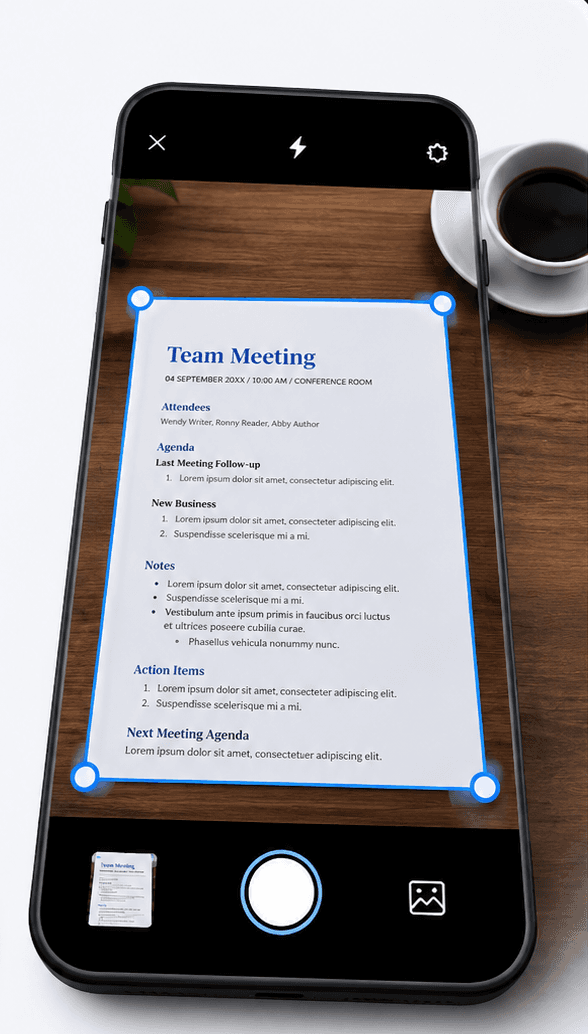
Document Scanner
Scan it. It becomes part of your file management system.
Point your camera at any paper document — a contract, an invoice, a receipt. Filex AI reads it, names it clearly, and files it using the same document management rules as everything else you upload, so scans and digital files stay in one organized system.
- 01
Tap scan and point your camera
Open Filex AI, tap scan, and point your camera at any document. Then tap organize. That is the whole job.
- 02
AI reads the document
OCR and content analysis extract what the document actually is: the type, the people and places in it, the dates, the amounts.
- 03
It files itself
The scan lands in the folder that fits it — or Filex AI creates one. It gets a clear name built from its content, not "Scan_20260714.pdf".
- 04
Find it by asking
Weeks later, just type "find Luis's passport" or "show the signed lease for Baker Street". The scan is already indexed, named, and linked.
Smart Grouping & Lenses
Group your files, your way
Describe a group once — Filex AI keeps it live and up to date automatically, across every document type you manage.
“Group all my contracts by client”
“Group receipts and invoices by month”
“Create a Lens for onboarding paperwork”
“Group scanned documents by category”
“Group all my tax documents by year”
“Create a Lens for signed agreements”
“Group screenshots and photos by content”
“Create a Lens for documents due this week”
Solutions
AI file organization for your use case
Purpose-built workflows with tailored folder structures, extraction, and search.
By profession & file type
Property & Real Estate
AI file and document management for property professionals. Automatically organize leases, deeds, inspection reports, and invoices by property address, then find any document with natural language search.
Explore Property & Real EstateLaw Firms & Legal
AI file and document management for law firms. Automatically organize case files, contracts, court orders, and discovery documents by case and client, then find any document with natural language search.
Explore Law Firms & LegalMedical & Healthcare
AI file and document management for medical records. Automatically organize lab reports, prescriptions, bills, and insurance claims by patient, then find any document with natural language search.
Explore Medical & HealthcareHR Teams
AI file and document management for HR teams. Automatically organize resumes, offer letters, employee records, and payroll documents by employee, then find any document with natural language search.
Explore HR TeamsSmall Business
AI file and document management for small business owners. Automatically organize invoices, receipts, contracts, and client documents, then find any file with natural language search. No admin staff needed.
Explore Small BusinessTax & Financial Documents
AI file and document management for tax and financial documents. Automatically organize receipts, invoices, bank statements, and tax forms by year and category, then find any document with natural language search.
Explore Tax & Financial DocumentsStudents & Education
AI file and document management for students. Automatically organize lecture notes, assignments, research papers, and study material by subject, then find any document with natural language search.
Explore Students & EducationScreenshots & Photos
AI file and document management for screenshots and photos. Automatically organize thousands of screenshots by content, extract text with OCR, and find any screenshot with natural language search.
Explore Screenshots & PhotosImages & Photo Libraries
AI image management for large photo and image libraries. Automatically organize product photos, design assets, camera exports, and scanned images by content, then find any image with natural language search.
Explore Images & Photo LibrariesAI Cloud Storage
Filex AI is free cloud storage with AI built in. Store, sync, and access your files from any device, while AI automatically renames, organizes, and makes everything searchable in plain English.
Explore AI Cloud StorageBy device
Android
AI file and document management for Android. Automatically organize downloads, screenshots, PDFs, and documents on your phone, then find any file with natural language search.
Explore AndroidiPhone
Filex AI brings AI file management to iPhone. It reads Mail attachments, Notes scans, and PDFs saved on your iPhone and files them into a searchable library automatically.
Explore iPhoneiPad
AI file and document management for iPad. Automatically organize files, scans, and PDFs saved on your iPad, then find any file with natural language search.
Explore iPadMore industries & file types
Still have paper? Scan it straight into the system
The Filex AI document scanner reads, names, and files whatever you point your camera at.
What People Are Saying
Join thousands who've revolutionized their file management
I’m a property agent and deal with floor plans, contracts, and client documents every day. This made my files much easier to manage without manual sorting.
As a property agent, I’m constantly downloading agreements and brochures. Finding things quickly before client calls is way less stressful now.
I’m a software developer and my Downloads folder was chaos—screenshots, logs, random PDFs. This organised everything better than I expected.
I work in marketing and download a lot of decks and reports. This saved me during meetings when I needed files fast.
I’m a college student and my notes and PDFs were always scattered. This helped me clean things up without thinking too much.
I was a bit worried about privacy at first, but it feels safe. I mostly use it for work documents and research files.
Privacy & security built in
Your files are protected using modern security and privacy best practices
Encrypted by Default
All files and related metadata are encrypted both in transit and at rest using industry-standard encryption methods.
GDPR-Compliant Architecture
Designed in line with GDPR principles including data minimisation, purpose limitation, and user-controlled access.
Limited Processing Scope
Files are processed only during the organisation workflow. Once organisation is completed, files are no longer accessed or processed.
User-Only Data Access
Only you can access your files. We do not sell user data, and files are never used for model training or secondary purposes.
Secure Cloud Infrastructure
Data is stored on hardened cloud infrastructure with strict access controls, auditing, and continuous monitoring.
Security Best Practices
Security controls follow least-privilege access, secure key management, and proactive risk mitigation practices.
Frequently asked questions
Everything you need to know about using Filex AI
What is AI file management?
AI file management is software that reads the content of your files — documents, PDFs, scans, screenshots — and uses that understanding to organize them automatically. Instead of you creating folders and naming files, the AI sorts everything into smart folders, renames files clearly, and makes them searchable in natural language.
How is it different from a traditional file manager?
A traditional file manager only stores what you give it: you create the folders, pick the names, and remember where things live. AI file management flips that. Filex AI reads what is inside each file and does the filing for you, so the structure builds itself and search works on content, not just filenames.
What kinds of files can Filex AI organize?
PDFs, scanned documents, images, screenshots, and common office documents. Scans and screenshots are processed with OCR, so text trapped inside images becomes fully searchable too.
Does the AI change or rename my original files?
No. Your originals stay untouched. Filex AI builds an organized, clearly named view on top of them — you only see renamed copies inside your Filex library, and you can download or move files whenever you want.
Which devices does it work on?
Filex AI works on the web, iPhone, and Android, and everything stays in sync. A file organized on your phone is instantly available on the web, and vice versa.
Is Filex AI free to try?
Yes. Every account starts on the free Spark plan with no credit card required, so you can upload a messy folder and watch it get organized before deciding to upgrade.
Is my data private?
Yes. Files are encrypted in transit and at rest, are private to your account, and are never sold, shared, or used to train public AI models.
Try AI file management free
Upload your messiest folder and watch Filex AI organize it in seconds.Upload your messiest folder and watch Filex AI organize it in seconds. No credit card required.