
AI file & document management built for small business

Filex AI reads every invoice, receipt, contract, and client document, then files it by client and category, renames it clearly, and makes it searchable in plain English. Run your paperwork without hiring for it.

No credit card required ยท Free plan included

A real small business workflow. Messy invoices, receipts, and contracts get organized by client and category in seconds.

The Problem

Paperwork grows faster than your business

Every client, vendor, and sale adds invoices, receipts, and contracts. When you are the owner, the accountant, and the admin, manual filing is the first thing that breaks.

10+
hours saved monthly on business paperwork
3 sec
to find any invoice or contract
100%
files organized by client and category
๐Ÿ—‚๏ธ

Documents scattered everywhere

Invoices in email, receipts in your camera roll, contracts in downloads. Nothing lives in one place, and nothing is named consistently.

โฑ๏ธ

Tax season panic

Finding a year of receipts and invoices means digging through folders named "scan_final_v2.pdf" right when your accountant needs them.

๐Ÿ’ธ

Lost money in lost documents

Unclaimed expenses, unpaid invoices, and missed vendor credits hide inside documents nobody can find when it matters.

๐Ÿ“…

Contracts renew without warning

Vendor agreements, leases, and subscriptions auto-renew silently because the dates are buried in PDFs nobody re-reads.

How it works

Set up AI file management in three steps

From shoebox chaos to an organized business in minutes.

01

Upload your business files

Drag in invoices, receipts, contracts, and scans from desktop, phone, or email. Any format, any filename.

02

AI reads and organizes

Filex AI extracts clients, amounts, dates, and document types, then groups everything by client and category and renames files consistently.

03

Find anything instantly

Search in plain English across your whole business on web, iPhone, or Android. Every device stays in sync.

Features

Everything small business document management needs, automated by AI

Built for owners who handle sales, delivery, and the books, without an admin team.

๐Ÿข

Auto-organize by client and category

Filex AI detects the client, vendor, and document type inside each file and sorts invoices, receipts, and contracts into the right place automatically.

๐Ÿ”ญ

AI Lenses for your business views

Create collections in natural language, like "everything for tax year 2026" or "all Acme Corp paperwork". One document can live in a client lens and a tax lens at the same time without duplication.

๐Ÿ”

Natural language search

Ask "find the unpaid invoice for Acme Corp" and get the exact file in seconds. Search by client, amount, date, or document type.

๐Ÿท๏ธ

Smart renaming

Turns "scan_093012.pdf" into "2026-03_Acme-Corp_Invoice-0042.pdf" using the client, date, and document type extracted from the content.

๐Ÿงพ

Entity extraction

Client names, amounts, due dates, and contract terms are pulled out of every document and turned into structured, searchable data.

โฐ

Smart reminders

Invoice due dates, contract renewals, and subscription terms are detected inside your documents so you get reminded before they cost you money.

๐Ÿ“„

OCR for scans and photos

Photographed receipts, scanned contracts, and signed agreements become fully searchable text documents.

๐Ÿ—‚๏ธ

Search across every format

PDFs, images, screenshots, Word, Excel, and CSV files are all indexed. One search covers your entire business.

๐Ÿ“ท

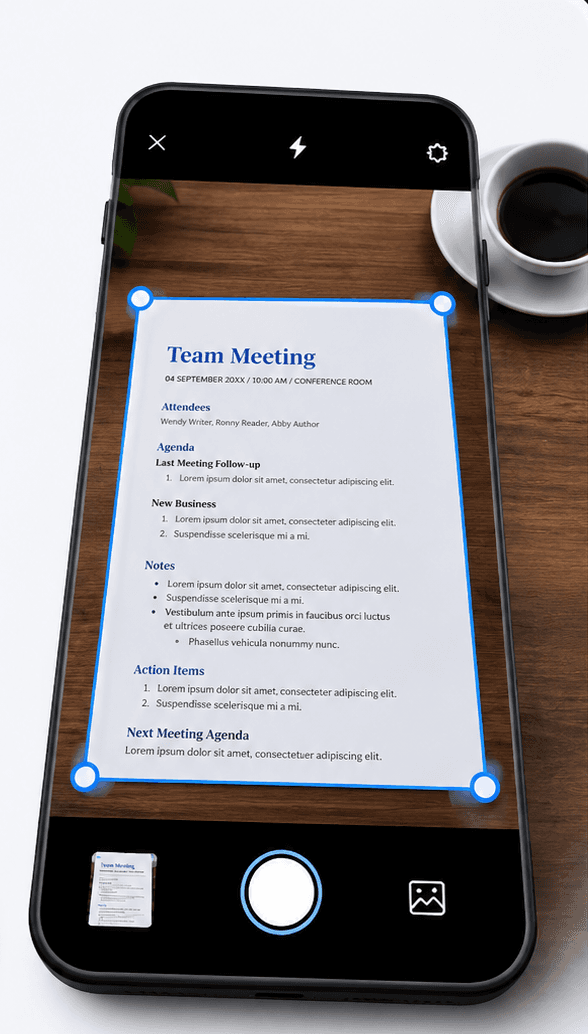
Built-in AI document scanner

Scan paper invoices and receipts on the go โ€” each scan is filed by client and category, ready for tax season.

๐Ÿ”’

Private, on every device

Business data is encrypted in transit and at rest, never used to train public AI models. Available on Android, iPhone, iPad, and the web.

Still on paper? Scan it straight into the system

The Filex AI document scanner reads, names, and files whatever you point your camera at โ€” with the same Small Business organization applied automatically.

Explore the AI document scanner

Before and after

From a messy downloads folder to a business filing system

Filex AI reads document content, like client names, amounts, dates, and document types, and builds the structure for you.

Before

  • ๐Ÿ“„scan_20260114_093012.pdf
  • ๐Ÿ“„invoice-final-FINAL.pdf
  • ๐Ÿ“„IMG_4821.jpg
  • ๐Ÿ“„Document (7).pdf
  • ๐Ÿ“„receipt_photo.jpeg
  • ๐Ÿ“„contract-acme (2).pdf

After: organized by Filex AI

๐Ÿข Acme Corp

  • Invoices โ€บ 2026-03_Acme-Corp_Invoice-0042.pdf
  • Contracts โ€บ 2026_Acme-Corp_Service-Agreement.pdf

๐Ÿงพ Expenses & Receipts

  • Software โ€บ 2026-03_Hosting-Receipt.pdf
  • Office โ€บ 2026-03_Supplies-Receipt.pdf
AI extraction

Every detail, pulled out automatically

From invoice-final-FINAL.pdf. No manual data entry, ever.

๐Ÿข Client

Acme Corp

๐Ÿ“„ Type

Invoice

๐Ÿ’ฐ Amount

$1,240.00

๐Ÿ“… Due Date

31 Mar 2026

โœ๏ธ Status

Unpaid

Use cases

Just ask, in plain English

โ€œFind the unpaid invoice for Acme Corpโ€

โ€œShow all receipts from Marchโ€

โ€œWhich contracts expire this quarter?โ€

โ€œFind the signed agreement with ABC Suppliesโ€

โ€œShow every expense over $500โ€

โ€œFind the GST invoice from my hosting providerโ€

โ€œWhich client documents are missing signatures?โ€

โ€œShow all vendor bills due this weekโ€

Comparison

Why switch from manual folders

Everything you do by hand today, Filex AI does automatically the moment a file arrives.

Capability

Filex AI

Manual folders

Auto-organize by client and category

Files sorted by client, vendor, and document type the moment they arrive

Content-based renaming

Clear names built from client, date, and document type found inside the file

OCR for receipts and scans

Photographed receipts and scanned contracts become searchable text

Natural language search

Type "find the unpaid invoice for Acme Corp" and get the exact file

AI Lenses collections

One document can live in many collections at once, with no duplication

Due date and renewal reminders

Invoice and contract dates pulled from documents automatically

Cross-device sync

Web, iPhone, and Android stay in sync in real time

Encrypted and private

Files encrypted in transit and at rest, never used to train public models

Simple, transparent pricing

Start free. Upgrade only when you need more power.

Free

Start organizing smarter with AI-powered file management.

$0
  • 20 files one time
  • AI content analysis & auto-sorting
  • Smart file renaming
  • Basic tagging
  • Cloud sync across devices
  • Export Organized Folders
Most Popular

Premium

Ideal for professionals who organise files, notes, and projects every day.

$2.99/month
  • 500 files organization per month
  • Advanced subject-based folders
  • OCR for images & scans
  • Handwritten notes analysis
  • Mobile app access
  • Share-to-organize from anywhere
  • Priority support
  • Export Organized Folders
Best Value

Premium (Yearly)

Save more with annual billing

$29/year
  • 6000 files organization per year
  • Advanced subject-based folders
  • OCR for images & scans
  • Handwritten notes analysis
  • Mobile app access
  • Share-to-organize from anywhere
  • Priority support
  • Export Organized Folders

Guides & resources

Small business file & document management guides

Deep dives on organizing invoices, receipts, and client documents with AI.

The Master Guide: How to Organize Property Expenses Efficiently in 2026
Property AI Expenses9 min read

The Master Guide: How to Organize Property Expenses Efficiently in 2026

Learn how to organize maintenance invoices, manage property utility bills digitally, and organize property expenses efficiently using AI in 2026.

Jun 20
The Ultimate Guide to AI Bill Management in 2026
Financial Document Management9 min read

The Ultimate Guide to AI Bill Management in 2026

Learn how AI bill management helps you organize bills, invoices, receipts, due dates, subscriptions, and financial documents with smart search, automatic filing, reminders, and Filex AI.

Jun 1
Best Practices for Organizing Financial Documents Digitally Using AI in 2026
Financial Document Management9 min read

Best Practices for Organizing Financial Documents Digitally Using AI in 2026

Learn the best practices for organizing financial documents digitally in 2026, including centralization, AI renaming, smart search, dynamic collections, reminders, and mobile receipt scanning with Filex AI.

Jun 1
How to Find Financial Documents Instantly Using AI Search in 2026
Financial Document Management8 min read

How to Find Financial Documents Instantly Using AI Search in 2026

Learn how AI search helps you instantly find financial documents like bills, invoices, receipts, contracts, and tax records using OCR, natural language search, AI Lenses, and Filex AI.

Jun 1
Tax Document Organizer: How to Organize Tax Records Automatically in 2026
Financial Document Management10 min read

Tax Document Organizer: How to Organize Tax Records Automatically in 2026

Learn how an AI-powered tax document organizer helps you automatically organize receipts, invoices, W-2s, 1099s, W-9s, statements, deductions, reminders, and audit-ready records with Filex AI.

Jun 1
How to Find Tax Documents Instantly Using AI Search in 2026
Financial Document Management9 min read

How to Find Tax Documents Instantly Using AI Search in 2026

Learn how AI tax document search helps you instantly find W-9s, 1099s, receipts, property tax statements, deductions, and scanned PDFs using OCR, natural language search, AI Lenses, and Filex AI.

Jun 1

Frequently asked questions

Everything you need to know about using Filex AI

What is AI file and document management for small business?

AI file and document management for small business uses artificial intelligence to read the content of your business documents, such as invoices, receipts, contracts, and client files, and automatically organize them by client and category, rename them consistently, and make them searchable in natural language. Instead of manually creating folders per client, the AI builds and maintains the structure for you.

How does Filex AI organize business documents?

Filex AI reads each document using OCR and AI content analysis, extracts key details like client name, amount, due date, and document type, then groups files by client and category. Files are renamed with a clear pattern like 2026-03_Acme-Corp_Invoice-0042.pdf so they stay identifiable everywhere.

Can it help me get ready for tax season?

Yes. Because every invoice and receipt is read, categorized, and dated automatically, you can pull up a full year of expenses in seconds. AI Lenses let you create a collection like "everything for tax year 2026" that updates itself as new documents arrive.

Can I search documents by client or amount?

Yes. Filex AI supports natural language search, so you can type queries like "find the unpaid invoice for Acme Corp" or "show every expense over $500". Because the AI indexes document content, not just filenames, it finds the right file even if it was originally named scan_20260114.pdf.

Is my business data private?

Yes. All files are encrypted in transit and at rest on secure cloud infrastructure. Your documents are private to your account, are never sold or shared, and are never used to train public AI models.

Can it handle photographed receipts and scanned contracts?

Yes. Filex AI uses OCR to read photographed receipts, scanned contracts, and signed agreements, turning them into fully searchable text documents.

Will it remind me about invoice due dates and renewals?

Yes. Filex AI extracts invoice due dates, contract end dates, and subscription terms from your documents automatically, so nothing renews or goes unpaid without you knowing.

Do I need to rename or sort files before uploading?

No. Upload files exactly as they are. Messy names, scans, photos, and mixed formats are all fine. The AI reads the content and handles the naming, grouping, and categorization for you.

Is Filex AI affordable for a small business?

Yes. Every account starts on the free Spark plan with no credit card required, so you can organize your messiest folder before paying anything. Paid plans cost far less than the hours of admin time they replace each month.

Put your business paperwork on autopilot

Join small business owners who let AI handle the filing. Free to start, no credit card required.