AI file management, built around how iPhone actually works

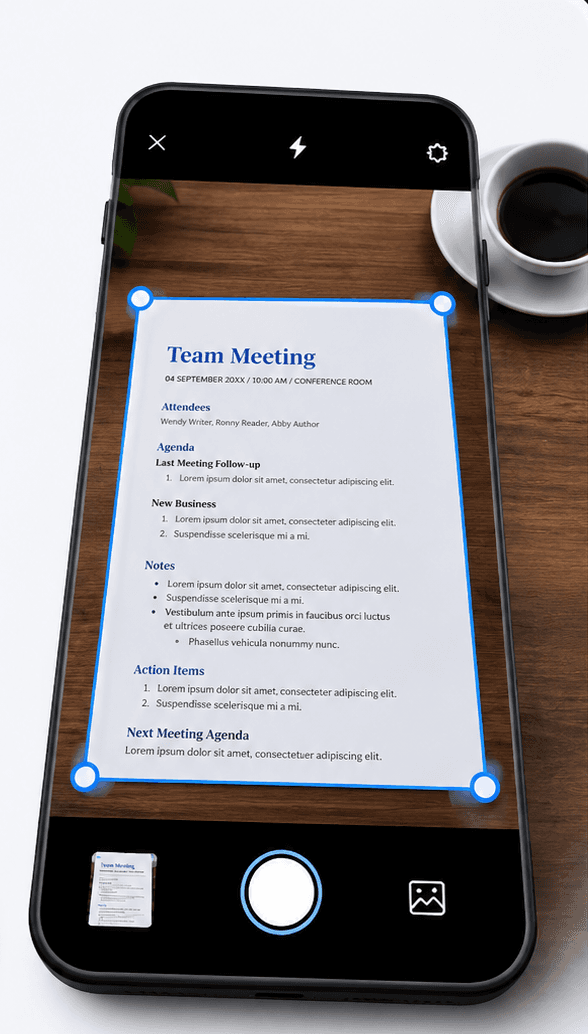
Mail attachments, Notes scans, and files saved from Safari or WhatsApp all land on your iPhone with no shared structure. Filex AI reads what is actually inside them and manages the filing for you, so nothing sits unsorted in iCloud Drive again.

No credit card required ยท Free plan included

A cluttered iCloud Drive gets filed into named, searchable folders in under 30 seconds.

The Problem

iCloud Drive and Mail quietly turn into a black hole

Between Mail attachments, Notes scans, and files shared over Messages or WhatsApp, your iPhone collects documents from every direction with nothing tying them together.

9+
hours saved monthly on iCloud cleanup
4 sec
to find any file on your iPhone
100%
files managed automatically
๐Ÿ“ฅ

Attachments buried across three apps

A PDF from Mail, a scan from Notes, and a document from Messages all live in different places, so nothing is ever where you last remember seeing it.

๐Ÿ”Ž

Files app search only matches names

Searching "insurance" finds nothing if the file is called Scan_014.pdf, even though the word is right there in the document.

โš ๏ธ

iCloud storage warnings with no explanation

Duplicate scans and forgotten exports quietly fill your iCloud plan until you get a "storage almost full" alert with no idea what to delete.

๐Ÿ“

Notes scans stay flat, unsearchable images

Documents scanned in the Notes app look sharp but hold their text as pixels, so none of that content is searchable later.

How it works

Get iPhone file management set up in three steps

From a cluttered iCloud Drive to a fully searchable library in minutes.

01

Connect Filex AI to your iPhone

Install from the App Store and grant access to the files you want managed. Setup takes under a minute.

02

AI reads and files everything

Filex AI scans your Files app, Notes exports, and Mail attachments, pulls out the key details, and sorts each one into a smart folder.

03

Ask for anything, instantly

Search in plain English on your iPhone, or pick up the same library on web and Android.

Features

Everything AI file management for iPhone should include

Built for anyone whose iCloud Drive, Notes scans, and Mail attachments have drifted into an unsearchable mess.

๐Ÿ“

Automatic iCloud Drive file management

Filex AI reads every PDF, scan, and document saved to your iPhone and files it into smart folders by topic the moment it lands.

๐Ÿ”ญ

AI Lenses for personal collections

Build collections in plain English, like "everything for tax season" or "all medical records". One file can sit in several lenses at once with no duplication.

๐Ÿ”

Natural language search

Ask "find the insurance card I saved in Notes" and get the exact file back in seconds, right from your iPhone.

๐Ÿท๏ธ

Smart renaming

Turns "Scanned Document.pdf" into "2026-03_Health-Insurance-Card.pdf" using the content, dates, and document type it detects automatically.

๐Ÿ“„

OCR for Notes scans and Mail PDFs

Documents scanned in Notes and PDFs forwarded through Mail both become fully searchable text, not flat images.

๐Ÿงพ

Entity extraction

Provider names, dates, member IDs, and amounts hidden inside your files are pulled out into structured, searchable data.

โฐ

Renewal and expiry reminders

Insurance renewals, warranty expirations, and booking dates are detected automatically so they never get buried in Mail.

๐Ÿ“ฒ

Managed in sync with web and Android too

Anything Filex AI files on your iPhone shows up instantly on the web and on Android if you use it.

๐Ÿ”’

Private, on your terms

Files stay encrypted in transit and at rest, and are never used to train public AI models.

Before and after

From a cluttered iCloud Drive to a searchable iPhone

Filex AI reads the content inside each file, like document type, dates, and key details, then manages the folder structure for you automatically.

Before

  • ๐Ÿ“„Scanned Document.pdf
  • ๐Ÿ“„IMG_5190.HEIC
  • ๐Ÿ“„Mail Attachment.pdf
  • ๐Ÿ“„file (3).pdf
  • ๐Ÿ“„Notes Export.pdf
  • ๐Ÿ“„WhatsApp Document 2026-04-11.pdf

After: organized by Filex AI

๐Ÿฅ Health

  • Records โ€บ 2026-03_Vaccination-Record.pdf
  • Insurance โ€บ 2026-03_Health-Insurance-Card.pdf

๐Ÿงพ Warranties & Receipts

  • Electronics โ€บ 2026-03_MacBook-Warranty.pdf
  • Shopping โ€บ 2026-03_Apple-Store-Invoice.pdf
AI extraction

Every detail, pulled out automatically

From Scanned Document.pdf. No manual data entry, ever.

๐Ÿฅ Type

Insurance Card

๐Ÿข Provider

Blue Shield

๐Ÿ“… Valid Until

Dec 2026

๐Ÿ†” Member ID

BS-4471X

๐Ÿ“ Text extracted

Yes, via OCR

Use cases

Just ask, in plain English

โ€œFind the insurance card I saved in Notesโ€

โ€œShow every PDF Mail delivered this monthโ€

โ€œWhich files are warranty documents?โ€

โ€œFind my vaccination recordโ€

โ€œShow documents AirDropped from my Macโ€

โ€œFind the invoice I scanned with Notesโ€

โ€œWhich files came in on WhatsApp last week?โ€

โ€œShow every file larger than 20MBโ€

Comparison

Why the built-in Files app falls short

Everything you currently sort by hand, Filex AI handles the moment a file reaches your iPhone.

Capability

Filex AI

Default Files app

Automatic file management

Every file sorted into a smart folder by content as soon as it arrives

Content-based renaming

Names built from the document type and date found inside the file itself

OCR for Notes scans and Mail PDFs

Scans and forwarded PDFs both become full-text searchable

Natural language search

Type "find my vaccination record" and get the exact match

AI Lenses collections

One file can belong to several collections at once, with no duplication

Renewal and expiry reminders

Insurance and warranty dates surfaced automatically from your documents

Cross-device sync

Web, iPhone, and Android stay in sync in real time

Encrypted and private

Files encrypted in transit and at rest, never used to train public models

Simple, transparent pricing

Start free. Upgrade only when you need more power.

Free

Start organizing smarter with AI-powered file management.

$0
  • 20 files one time
  • AI content analysis & auto-sorting
  • Smart file renaming
  • Basic tagging
  • Cloud sync across devices
  • Export Organized Folders
Most Popular

Premium

Ideal for professionals who organise files, notes, and projects every day.

$2.99/month
  • 500 files organization per month
  • Advanced subject-based folders
  • OCR for images & scans
  • Handwritten notes analysis
  • Mobile app access
  • Share-to-organize from anywhere
  • Priority support
  • Export Organized Folders
Best Value

Premium (Yearly)

Save more with annual billing

$29/year
  • 6000 files organization per year
  • Advanced subject-based folders
  • OCR for images & scans
  • Handwritten notes analysis
  • Mobile app access
  • Share-to-organize from anywhere
  • Priority support
  • Export Organized Folders

Guides & resources

iPhone file management guides

Practical walkthroughs for taming iCloud Drive, Notes scans, and Mail attachments with AI.

Which Apple Intelligence Features Actually Organize Your Photos and Files? (2026)
iPhone8 min read

Which Apple Intelligence Features Actually Organize Your Photos and Files? (2026)

Apple Intelligence brings powerful AI to your iPhone and Mac in 2026, but does it actually organize your files? Discover the native features and why Filex AI is the ultimate upgrade.

Jun 26
Apple Files vs Filex AI: The Best File Organizer on iPhone (2026)
iPhone8 min read

Apple Files vs Filex AI: The Best File Organizer on iPhone (2026)

Ditch the manual sorting. See why Filex AI is the best alternative to Apple Files, acting as a powerful file sorter and automatic document organizer for iOS.

May 10
How to Find Any File on iPhone in 2026 Using AI (Better Than Spotlight & Files App)
iPhone8 min read

How to Find Any File on iPhone in 2026 Using AI (Better Than Spotlight & Files App)

Struggling to find files on your iPhone? Spotlight and the Files app often fail. Learn how AI-powered file organizers use OCR and smart search to instantly find documents, screenshots, and PDFs in seconds.

Apr 27
Files App vs Filex AI: Which Is Better for iPhone File Organization in 2026?
iPhone9 min read

Files App vs Filex AI: Which Is Better for iPhone File Organization in 2026?

Confused between the iPhone Files app and Filex AI? Discover which one is better for finding, organizing, and managing PDFs, screenshots, and documents using AI in 2026.

Apr 27
The Best AI File Organizer for iOS: Organize Your iPhone Files Automatically
iPhone9 min read

The Best AI File Organizer for iOS: Organize Your iPhone Files Automatically

Looking for the best AI file organizer for iOS? This guide breaks down why iPhone file management gets messy so fast, how AI actually works on iOS, and why Filex AI is the only app that combines OCR, smart renaming, and natural language search in one place.

Apr 15
Best AI PDF Organizer App for iPhone in 2026: Stop Losing Your Documents
iPhone5 min read

Best AI PDF Organizer App for iPhone in 2026: Stop Losing Your Documents

Discover the best PDF organizer apps for iPhone in 2026. Learn how to automatically manage, rename, and search PDFs using AI tools like Filex AI.

Apr 15

Frequently asked questions

Everything you need to know about using Filex AI

What is AI file management for iPhone?

It reads the content of files saved on your iPhone, not just their filenames, and uses that to sort them into smart folders, rename them clearly, and make them searchable by what they contain. Filex AI does this automatically for anything saved through the Files app, Notes, or Mail.

How does Filex AI decide where a file belongs?

Each file is read with OCR and content analysis to pull out its document type, dates, and topic. Those details are what drive the folder placement and the new file name, not the original filename you started with.

Does it handle documents scanned in the Notes app?

Yes. Notes scans are one of the messiest sources on iPhone, since the text inside them is just an image. Filex AI runs OCR on every scan so the words become searchable and the file gets filed by what it actually is.

Can it read PDFs that come in through Mail or WhatsApp?

Yes. Attachments from Mail, Messages, and WhatsApp are all picked up and processed the same way as anything saved directly to the Files app, so nothing gets left out because of where it arrived from.

Will managing files on my iPhone also update the web version?

Yes. Filex AI keeps your library in sync across devices, so anything filed on your iPhone appears instantly on the web and on Android if you use it too.

Is Filex AI free to try on iPhone?

Yes. The Spark plan on iPhone is free with no credit card required, so you can see how your files get managed before deciding whether to upgrade.

Can it remind me before an insurance card or warranty expires?

Yes. Renewal and expiry dates are extracted directly from your documents, so a card or warranty about to lapse surfaces on its own instead of staying buried in Mail.

How private is this on iPhone?

Files are encrypted both in transit and at rest, stay private to your account, and are never sold, shared, or used to train public AI models.

What are AI Lenses on iPhone?

AI Lenses are collections you describe in plain English, like "everything for tax season" or "all medical records", instead of folders you build by hand. A single file can appear in more than one lens at once without being duplicated.

Stop sorting your iPhone files by hand

Join iPhone users who let Filex AI handle iCloud Drive, Notes scans, and Mail attachments automatically. Free to start, no credit card required.