
AI file & document management built for property professionals

Filex AI reads every lease, deed, invoice, and inspection report, then files it by property address, renames it clearly, and makes it searchable in plain English. No folders to create. No manual sorting.

No credit card required Β· Free plan included

Watch a real property agent workflow. Messy leases, invoices, and reports get organized by property address in seconds.

The Problem

Property paperwork multiplies with every unit you manage

Every property adds leases, renewals, invoices, inspections, insurance, and compliance documents. Manual folders can’t keep up.

10+
hours saved weekly on filing
3 sec
to find any property document
100%
files grouped by property
πŸ—‚οΈ

Files scattered across devices

Leases in email, receipts on your phone, inspection photos in WhatsApp. Nothing lives in one place, and nothing is named consistently.

⏱️

Hours lost searching

Finding one signed lease means digging through folders named "scan_final_v3.pdf". Multiply that by every tenant question and audit request.

πŸ“…

Missed renewals & deadlines

Lease expiries, insurance renewals, and inspection due dates hide inside documents nobody re-reads until it’s too late.

βš–οΈ

Compliance & audit risk

When a dispute or audit hits, you need the exact agreement, addendum, and payment trail right away. Messy files turn that into a crisis.

How it works

Set up AI file management in three steps

From chaos to an organized property portfolio in minutes.

01

Upload your property files

Drag in leases, deeds, invoices, inspection reports, and photos from desktop, phone, or scans. Any format, any filename.

02

AI reads and organizes

Filex AI extracts tenants, addresses, amounts, and dates, then groups everything by property and renames files consistently.

03

Find anything instantly

Search in plain English across your whole portfolio on web, iPhone, or Android. Every device stays in sync.

Features

Everything property file management needs, automated by AI

Built for landlords, property managers, real estate agents, and investors handling documents at portfolio scale.

🏠

Auto-organize by property address

Filex AI detects the property address inside each document and files leases, invoices, and reports under the right property automatically.

πŸ”­

AI Lenses for property collections

Create collections in natural language, like "everything for 221B Baker Street" or "documents for tax season". One lease can live in Property, Taxes, and Legal at the same time without duplication.

πŸ”

Natural language search

Ask "find the signed lease for 221B Baker Street" and get the exact file in seconds. Search by tenant, address, amount, or clause.

🏷️

Smart renaming

Turns "scan_093012.pdf" into "2026_John-Smith_Lease.pdf" using tenant names, dates, and document type extracted from the content.

🧾

Entity extraction

Tenant names, landlords, rent amounts, invoice numbers, and expiry dates are pulled out of every document and turned into structured, searchable data.

⏰

Smart reminders

Lease expiries, insurance renewals, and payment deadlines are detected inside your documents so you get reminded before they slip.

πŸ“„

OCR for scans and screenshots

Photographed receipts, scanned agreements, and WhatsApp images become fully searchable text documents.

πŸ—‚οΈ

Search across every format

PDFs, images, screenshots, Word, Excel, and CSV files are all indexed. One search covers your entire property portfolio.

πŸ“·

Built-in AI document scanner

Scan a lease or inspection report at the property β€” it is read, named, and filed under the right property before you leave the site.

πŸ”’

Private, on every device

Encrypted in transit and at rest, never used to train public AI models. Available on Android, iPhone, iPad, and the web.

Still on paper? Scan it straight into the system

The Filex AI document scanner reads, names, and files whatever you point your camera at β€” with the same Property & Real Estate organization applied automatically.

Explore the AI document scanner

Before and after

From messy downloads to a portfolio filing cabinet

Filex AI reads the details inside every document, like tenant names, addresses, amounts, and dates, and builds the structure for you.

Before

  • πŸ“„scan_20260114_093012.pdf
  • πŸ“„lease_final_FINAL_v3.pdf
  • πŸ“„IMG_4821.jpg
  • πŸ“„invoice (2).pdf
  • πŸ“„doc-untitled.pdf
  • πŸ“„WhatsApp Image 2026-05-02.jpeg

After: organized by Filex AI

🏠 221B Baker Street

  • Leases β€Ί 2026_John-Smith_Lease.pdf
  • Invoices β€Ί 2026-05_Plumbing-Repair_Β£340.pdf
  • Inspections β€Ί 2026-03_Move-In-Report.pdf

🏒 Oak Villa, Unit 4B

  • Leases β€Ί 2025_Sarah-Connor_Renewal.pdf
  • Insurance β€Ί 2026_Building-Policy.pdf
AI extraction

Every detail, pulled out automatically

From lease_final_FINAL_v3.pdf. No manual data entry, ever.

πŸ‘€ Tenant

John Smith

πŸ“ Property

221B Baker Street

πŸ’° Monthly Rent

Β£2,450.00

πŸ“… Lease Expiry

14 Mar 2027

✍️ Signed

Yes, all parties

Auto Organization

Drag in leases and inspection reports. Filex AI files them by property.

Drop in leases, deeds, inspection reports, and vendor invoices, tell Filex AI how you want them grouped, and let AI understand, rename, and organize them instantly. It reads content β€” not just filenames β€” and follows your custom rule every time.

Understands file content, not just filenames
Learns your patterns over time
Smart renaming
Nested folder structures
Custom organization rules in plain English
Works with scanned documents
2.5 hrs
saved per day
50+
file formats
iOS & Android
mobile apps
Learn More

Custom organization rule

β€œGroup files by property address, then by document type”
221B Baker StreetElm Apartments4 Riverside Court
  • πŸ“„lease_final_FINAL_v3.pdf221B Baker Street/Leases/2026_Tenant-Agreement.pdf
  • πŸ“„invoice (2).pdfElm Apartments/Invoices/2026_Plumbing-Repair.pdf
  • πŸ“„scan_20260114_093012.pdf4 Riverside Court/Inspections/2026_Move-In-Report.pdf
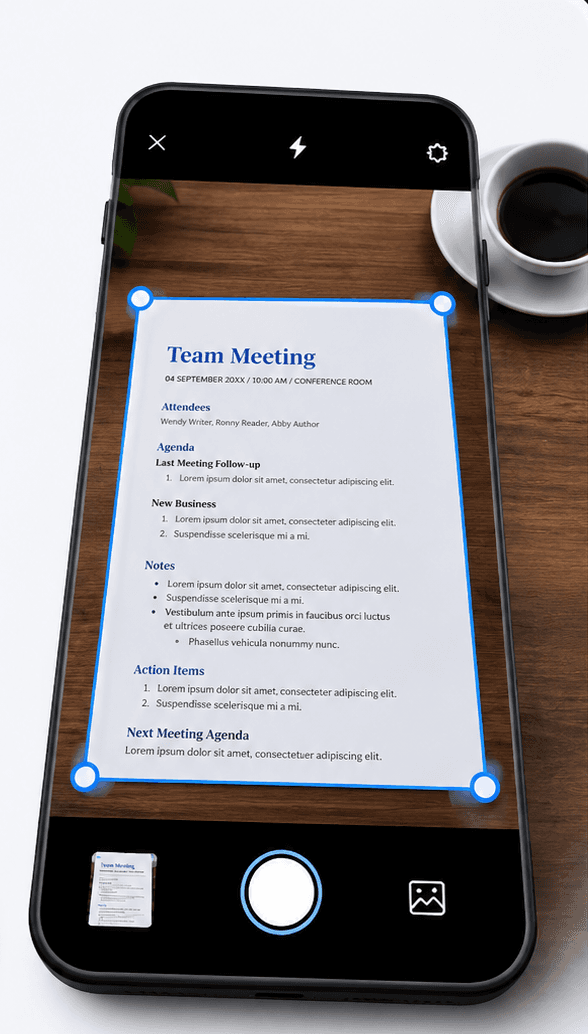
Filex AI document scanner scanning and organizing a document on mobile

Document Scanner

Scan it. Filex AI files it under the right property.

Point your camera at a lease, an inspection report, or a maintenance receipt. Filex AI reads it, names it clearly, and files it under the right property β€” no manual sorting.

  1. 01

    Tap scan and point your camera

    Open Filex AI, tap scan, and point your camera at any lease, inspection report, or receipt. Then tap organize. That is the whole job.

  2. 02

    AI reads the document

    OCR and content analysis extract what the document actually is: the property address, the tenant, the dates, the amounts.

  3. 03

    It files itself

    The scan lands in the property folder that fits it β€” or Filex AI creates one. It gets a clear name built from its content, not "scan_20260114.pdf".

  4. 04

    Find it by asking

    Weeks later, just type "find the signed lease for Baker Street" or "show inspection reports from March". The scan is already indexed, named, and linked.

Browser Extension

Capture lease pages and property photos β€” right inside Chrome

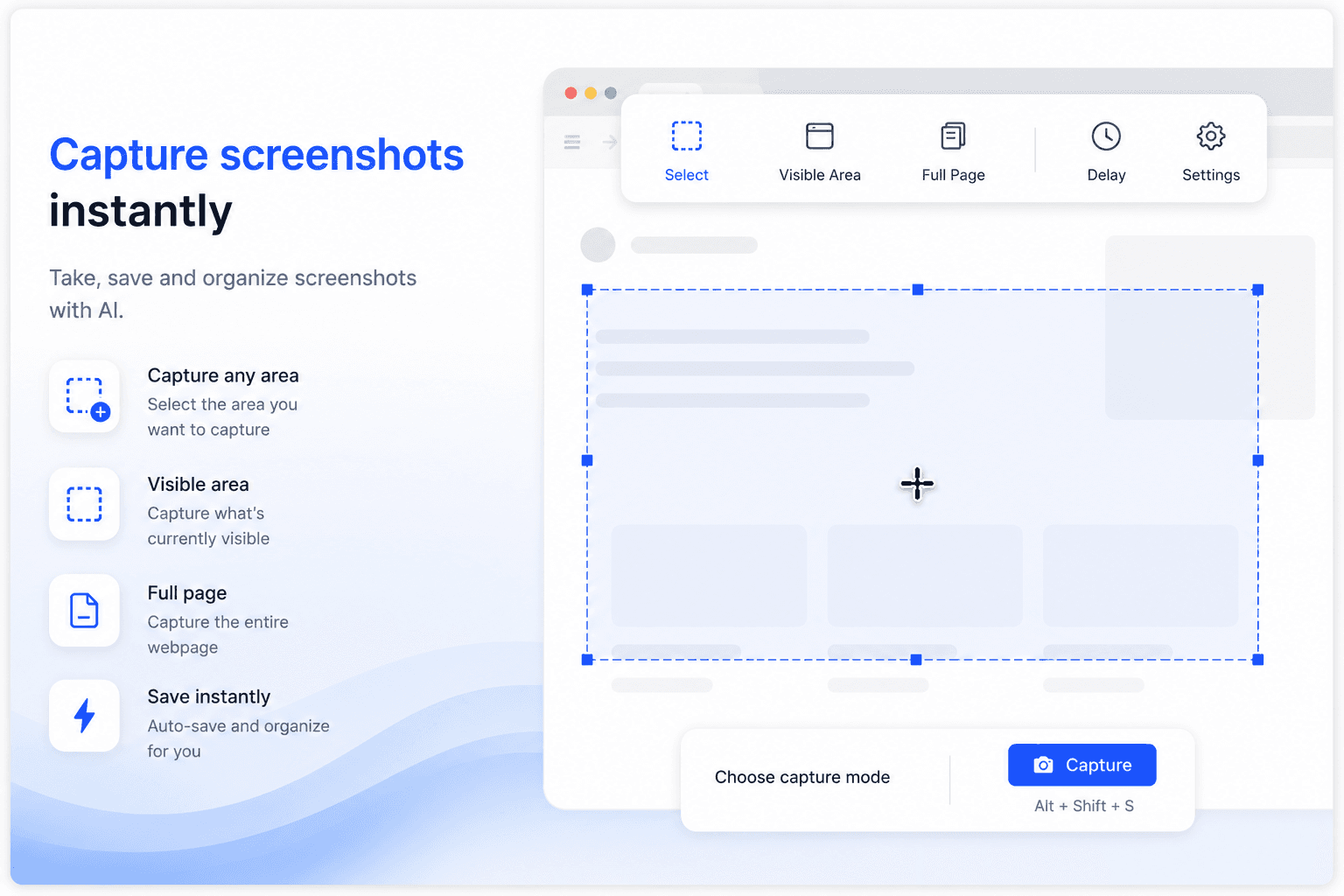
Take, save, and organize screenshots of listings, e-signature confirmations, and inspection photos with AI. Every screenshot you capture and every file you download gets named, sorted by property, and synced automatically β€” without leaving the tab.

  • Capture any area, the visible area, or a full listing page
  • Screenshots auto-saved, named, and filed under the right property
  • Downloads sorted into the right property folder automatically
  • Full-content search inside lease scans, photos, and PDFs
  • Instant sync to Filex AI on iPhone, Android, and web
Filex AI browser extension capturing and organizing a screenshot

Use cases

Just ask, in plain English

β€œFind the signed lease for 221B Baker Street”

β€œShow all invoices for Unit 4B”

β€œWhich leases expire in the next 60 days?”

β€œFind the 2025 inspection report for Oak Villa”

β€œShow John Smith's rent receipts”

β€œFind the insurance policy for Oak Villa”

β€œShow inspection photos from March 2026”

β€œWhich properties have unpaid maintenance invoices?”

Smart Grouping & Lenses

Group your properties, your way

Describe a group once β€” Filex AI keeps it live and up to date automatically.

β€œGroup all documents for 221B Baker Street”

β€œGroup leases by expiration date”

β€œCreate a Lens for tenants behind on rent”

β€œGroup inspection reports by property”

β€œGroup all vendor invoices this quarter”

β€œCreate a Lens for insurance paperwork”

β€œGroup maintenance requests by unit”

β€œCreate a Lens for signed lease agreements”

Available Everywhere

AI File Organizer for Property Managers β€” iPhone & Android

iPhone & iPad App

Scan documents, organize files, and search by content on the go. Available on iOS and iPadOS.

Get the app

Android App

Scan documents, organize files, and search by content on the go. Available on Android.

Get the app

Web App

Full-featured workspace in your browser. Organize, search, share, and manage files from anywhere.

Get started

Browser Extension

AI file management directly inside Google Drive, OneDrive, and Dropbox. No tab switching.

Add to Chrome

Comparison

Why switch from manual folders

Everything you do by hand today, Filex AI does automatically the moment a file arrives.

Capability

Filex AI

Manual folders

Auto-organize by property

Files sorted by property address and document type the moment they arrive

Content-based renaming

Clear names built from tenant, date, and document type found inside the file

OCR for scans and photos

Scanned leases and photographed receipts become searchable text

Natural language search

Type "find the signed lease for 221B Baker Street" and get the exact file

AI Lenses collections

One document can live in many collections at once, with no duplication

Deadline extraction

Lease expiry and renewal dates pulled from documents automatically

Cross-device sync

Web, iPhone, and Android stay in sync in real time

Encrypted and private

Files encrypted in transit and at rest, never used to train public models

Simple, transparent pricing

Start free. Upgrade only when you need more power.

Free

Start organizing smarter with AI-powered file management.

$0
  • 20 files one time
  • AI content analysis & auto-sorting
  • Smart file renaming
  • Basic tagging
  • Cloud sync across devices
  • Export Organized Folders
Most Popular

Premium

Ideal for professionals who organise files, notes, and projects every day.

$2.99/month
  • 500 files organization per month
  • Advanced subject-based folders
  • OCR for images & scans
  • Handwritten notes analysis
  • Mobile app access
  • Share-to-organize from anywhere
  • Priority support
  • Export Organized Folders
Best Value

Premium (Yearly)

Save more with annual billing

$29/year
  • 6000 files organization per year
  • Advanced subject-based folders
  • OCR for images & scans
  • Handwritten notes analysis
  • Mobile app access
  • Share-to-organize from anywhere
  • Priority support
  • Export Organized Folders

Privacy & security built in

Your files are protected using modern security and privacy best practices

Core Protection

Encrypted by Default

All files and related metadata are encrypted both in transit and at rest using industry-standard encryption methods.

Core Protection

GDPR-Compliant Architecture

Designed in line with GDPR principles including data minimisation, purpose limitation, and user-controlled access.

Core Protection

Limited Processing Scope

Files are processed only during the organisation workflow. Once organisation is completed, files are no longer accessed or processed.

User-Only Data Access

Only you can access your files. We do not sell user data, and files are never used for model training or secondary purposes.

Secure Cloud Infrastructure

Data is stored on hardened cloud infrastructure with strict access controls, auditing, and continuous monitoring.

Security Best Practices

Security controls follow least-privilege access, secure key management, and proactive risk mitigation practices.

Guides & resources

Property file management guides

Deep dives on organizing leases, automating renewals, and searching real estate documents with AI.

How to Automate Lease Reminders in 2026 Using AI
Property Document Organizer6 min read

How to Automate Lease Reminders in 2026 Using AI

Learn how property managers can automate lease renewal reminders using AI. Discover how Filex AI reads lease agreements, extracts deadlines, and sends automatic email notifications before renewal dates.

Jan 25

How to Manage Lease Agreements Digitally in 2026
Property Document Organizer12 min read

How to Manage Lease Agreements Digitally in 2026

Learn how to manage lease agreements digitally using AI. Discover how property managers and landlords can store, search, and track rental agreements automatically with smart document extraction and deadline reminders.

Jan 25
Real Estate Document Management with AI: Complete Guide for 2026
Property Document Organizer14 min read

Real Estate Document Management with AI: Complete Guide for 2026

Discover how AI-powered real estate document management helps agents and brokers organise purchase agreements, track closing deadlines, search property documents instantly, and eliminate folder chaos.

Jan 25
How to Search Real Estate Documents Using Natural Language in 2026
Property Document Organizer15 min read

How to Search Real Estate Documents Using Natural Language in 2026

Learn how to search real estate documents using AI and natural language. Discover how to find information inside purchase agreements, leases, and property files instantly without opening PDFs one by one.

Jan 25
Property Document Organizer with AI That Reads, Extracts, and Reminds
Property Document Organizer4 min read

Property Document Organizer with AI That Reads, Extracts, and Reminds

Filex AI automatically reads your property documents to extract tenant names, lease dates, and financial amounts then organizes files and sends deadline reminders without manual work.

Jan 21
How to Organize Property Documents Automatically in 2026 (Step by Step Guide)
Property Document Organizer6 min read

How to Organize Property Documents Automatically in 2026 (Step by Step Guide)

Learn how to organize property documents automatically in 2026 using AI. This step-by-step guide shows how to extract tenant details, lease dates, and amounts while setting up automatic reminders.

Jan 21

What People Are Saying

Join thousands who've revolutionized their file management

πŸ”΄Reddit
I’m a property agent and deal with floor plans, contracts, and client documents every day. This made my files much easier to manage without manual sorting.
P
via Reddit
🐦X
βœ“ Verified
As a property agent, I’m constantly downloading agreements and brochures. Finding things quickly before client calls is way less stressful now.
A
via X
πŸ”΄Reddit
I’m a software developer and my Downloads folder was chaosβ€”screenshots, logs, random PDFs. This organised everything better than I expected.
D
via Reddit
🐦X
βœ“ Verified
I work in marketing and download a lot of decks and reports. This saved me during meetings when I needed files fast.
B
via X
πŸ”΄Reddit
I’m a college student and my notes and PDFs were always scattered. This helped me clean things up without thinking too much.
S
via Reddit
🐦X
βœ“ Verified
I was a bit worried about privacy at first, but it feels safe. I mostly use it for work documents and research files.
S
via X

Complete guide

The Complete Guide to AI File Management for Property Managers

Why Spreadsheets and Shared Drives Break Down Once You Pass a Handful of Units

Most landlords start with a simple system: a folder per property, maybe a spreadsheet tracking rent and renewal dates. That works fine for one or two units, where you remember the details without needing the system to do much. The moment a portfolio grows past a handful of properties, the cracks start showing. A lease gets saved to the wrong property folder. A maintenance invoice sits in a general "Receipts" folder because nobody had time to file it properly. An inspection photo taken on-site through WhatsApp never makes it into any folder at all.

The deeper problem is that manual filing requires a person to correctly categorize every single document, every single time, for years, across an ever-growing number of properties and tenants. Property managers are not filing clerks by trade, they are juggling maintenance calls, showings, and tenant disputes, and filing is the task that gets deferred whenever something more urgent comes up. The backlog of "I will sort this later" documents grows quietly until an audit, a tenant dispute, or a sale forces someone to reconstruct a paper trail that was never properly organized in the first place.

AI-based organization removes the dependency on a person remembering to file correctly. Because Filex AI reads the property address, tenant name, and document type directly out of the file content rather than relying on where someone chose to drop it, the thousandth lease across your fortieth property gets sorted with the same accuracy as the first one you ever uploaded. There is no rule to forget and no exception pile that accumulates over time.

How AI Matches a Document to the Right Property Without You Labeling Anything

A lease, an inspection report, and a plumbing invoice can all be PDFs with equally unhelpful filenames like "scan_20260114_093012.pdf". A file-type or folder-based system has no way to tell them apart, and it certainly cannot tell you which of your properties any of them belongs to. Filex AI instead reads the actual content of the document, the property address printed on the lease, the unit number on the inspection form, the billing address on the vendor invoice, and uses that to determine both the document type and which property it belongs to.

This matters enormously for property professionals specifically, because the same document type recurs across every unit you manage. You might have forty leases, forty sets of inspection reports, and hundreds of maintenance invoices, and the only thing distinguishing one from another is the address and tenant buried inside the text. Filename-based or folder-based systems put the entire burden of that distinction on the person uploading the file. Content-based categorization removes that burden entirely, because the address inside the document is the signal, not a filename someone had to type correctly.

The same extraction that identifies the property also pulls out the tenant name, rent amount, and lease dates, which is what makes a query like "find the signed lease for 221B Baker Street" or "show all invoices for Unit 4B" return the exact file instantly, regardless of what it was originally named or which folder it was dropped into.

Handling Years of Backlogged Leases, Invoices, and Inspection Photos

Every property manager who has been in the business more than a year or two has a backlog: old leases from tenants who moved out years ago, inspection photos from a property that changed hands, invoices from vendors you no longer use. These documents matter for tax records, dispute history, and compliance, but almost nobody has time to go back and properly sort them. They sit in a general Downloads folder, an old email account, or a box of scanned paper, effectively invisible until a specific dispute or audit forces someone to go looking.

Filex AI is built to process that backlog exactly as it exists today, with no pre-sorting or renaming required first. Upload the entire mess, mixed properties, mixed tenants, mixed document types, scans and photos included, and every file gets read, matched to the correct property, and renamed in a single pass. The size of the backlog or how many years it spans does not change how the process works, because each document is evaluated on its own content rather than its position in a queue.

This is usually where property managers see the most immediate value, because the backlog is exactly the part of the paperwork problem that never gets solved by habit change alone. Staying organized going forward is one thing; untangling five years of inconsistent filing across a growing portfolio is a different problem entirely, and it is the one bulk AI organization is specifically built to solve.

  • Upload leases, invoices, and inspection photos exactly as they currently sit, no pre-sorting needed
  • Mixed-property batches are automatically split and filed under the correct address
  • Scanned paper and phone photos get OCR text extraction alongside native PDFs
  • Every file is renamed and dated as part of the same pass, no separate cleanup step

Turning Lease Expiries and Compliance Documents Into Dates You Actually See

A lease expiry date, an insurance renewal, or an inspection due date is only useful if someone notices it before it passes. In a folder-based system, those dates exist only inside the text of a PDF nobody re-opens until the deadline has already slipped, or worse, until a tenant dispute or audit request forces a scramble to find the exact agreement, addendum, and payment trail that applied at the time. That scramble is where compliance risk actually lives: not in the absence of records, but in the inability to retrieve the right one quickly enough.

Because Filex AI extracts dates directly from the content of every lease, insurance policy, and inspection report it processes, expiry and renewal information becomes visible across your whole portfolio rather than trapped inside individual files. A property manager overseeing dozens of units can see upcoming lease renewals the same way they would see line items in a spreadsheet, except the underlying data was never manually entered anywhere, it was read straight from the signed documents themselves.

This also strengthens your position when a dispute or audit does happen. Instead of searching a shared drive under time pressure, you can ask for "the signed lease for 221B Baker Street" or "all documents for Unit 4B" and get the complete, dated trail immediately, including the specific addendum, inspection report, or payment record that applies.

Frequently asked questions

Everything you need to know about using Filex AI

What is AI file and document management for property?

AI file and document management for property uses artificial intelligence to read the content of your real estate documents, such as leases, deeds, invoices, and inspection reports, and automatically organize them by property address, rename them consistently, and make them searchable in natural language. Instead of manually creating folders per property, the AI builds and maintains the structure for you.

How does Filex AI organize property documents?

Filex AI reads each document using OCR and AI content analysis, extracts key details like tenant name, property address, rent amount, and expiry dates, then groups files by property and document type (leases, invoices, inspections). Files are renamed with a clear pattern like 2026_John-Smith_Lease.pdf so they stay identifiable everywhere.

Can I search property documents by tenant name or address?

Yes. Filex AI supports natural language search, so you can type queries like "find the signed lease for 221B Baker Street" or "show all invoices for Unit 4B". Because the AI indexes document content, not just filenames, it finds the right file even if it was originally named scan_20260114.pdf.

Does it work for landlords with just a few properties?

Absolutely. Filex AI has a free Spark plan that is ideal for independent landlords with a handful of units. As your portfolio grows, the same AI structure scales with you. Property managers use it across hundreds of units without changing their workflow.

Are my leases and tenant documents secure?

Yes. All files are encrypted in transit and at rest on secure cloud infrastructure. Your documents are private to your account, are never sold or shared, and are never used to train public AI models.

Can I access my property files on mobile?

Yes. Filex AI works on web, iPhone, and Android with instant sync. Photograph a receipt or inspection issue on site, and it is organized under the right property and available on your desktop immediately.

Will AI file management help with lease renewals and deadlines?

Yes. Filex AI extracts lease expiry dates, renewal windows, and inspection due dates from your documents automatically, so you can see upcoming deadlines across your whole portfolio instead of discovering them too late.

Do I need to rename or sort my files before uploading?

No. Upload files exactly as they are. Messy names, scans, photos, and mixed formats are all fine. The AI reads the content and handles the naming, grouping, and categorization for you.

What are AI Lenses and how do they help with property files?

AI Lenses let you group documents using natural language instead of folders. You can create collections like "everything for 221B Baker Street", "tax season documents", or "insurance paperwork", and a single file can appear in multiple lenses at once without duplication. A lease, for example, can live in your property lens, your tax lens, and your legal lens at the same time.

Can I organize documents for multiple properties at once?

Yes. Upload files from your entire portfolio in a single batch, and Filex AI reads the property address inside each document to sort it correctly, even when leases, invoices, and reports for different buildings are mixed together in one folder.

Does Filex AI work with rental applications and background checks?

Yes. Rental applications, background check reports, and reference letters are read like any other document, with applicant names and dates extracted so they file under the right prospective tenant or unit automatically.

Can I track security deposits and move-out documentation?

Yes. Move-in and move-out inspection reports, deposit receipts, and damage claim photos are grouped under the relevant property and tenant, so you can pull the full deposit history for a unit when a dispute comes up.

Put your property files on autopilot

Join landlords, agents, and property managers who let AI handle the filing. Free to start, no credit card required.