AI file & document management built for students

Filex AI reads every lecture note, assignment, research paper, and study PDF, then files it by subject and semester, renames it clearly, and makes it searchable in plain English. No folders to create. No manual sorting.

No credit card required ยท Free plan included

Watch a real student workflow. Messy lecture notes, assignments, and papers get organized by subject in seconds.

The Problem

Study material multiplies every single semester

Every class adds lecture notes, slides, assignments, and research papers. Manual folders cannot keep up across multiple subjects.

7+
hours saved weekly on note management
3 sec
to find any lecture note or paper
100%
files grouped by subject
๐Ÿ—‚๏ธ

Notes scattered everywhere

Slides in email, notes on your phone, PDFs downloaded from ten different places. Nothing lives in one place, and nothing is named consistently.

โฑ๏ธ

Hours lost before exams

Finding the right lecture note means digging through folders named "notes_final_v3.pdf" the night before an exam.

๐Ÿ“…

Missed assignment deadlines

Due dates and submission deadlines hide inside documents nobody re-reads until it is too late.

๐Ÿ“š

Research papers everywhere

Papers for a thesis or project pile up across downloads and email, with no structure connecting them to the topic they support.

How it works

Set up AI file management in three steps

From chaos to an organized semester in minutes.

01

Upload your study files

Drag in lecture notes, slides, assignments, and papers from desktop, phone, or email. Any format, any filename.

02

AI reads and organizes

Filex AI extracts subject, topic, and dates, then groups everything by class and renames files consistently.

03

Find anything instantly

Search in plain English across every subject on web, iPhone, or Android. Every device stays in sync.

Features

Everything student file management needs, automated by AI

Built for students managing notes, assignments, and research across multiple subjects.

๐Ÿ“˜

Auto-organize by subject

Filex AI detects the subject and topic inside each document and files notes, assignments, and papers under the right class automatically.

๐Ÿ”ญ

AI Lenses for study collections

Create collections in natural language, like "everything for my thesis" or "semester 3 material". One paper can live in a subject lens and a thesis lens at the same time without duplication.

๐Ÿ”

Natural language search

Ask "find my notes on thermodynamics" and get the exact file in seconds. Search by subject, topic, date, or type.

๐Ÿท๏ธ

Smart renaming

Turns "notes_20260114.pdf" into "2026-03_Thermodynamics_Week5-Notes.pdf" using subject, date, and content type extracted from the content.

๐Ÿงพ

Entity extraction

Subjects, topics, due dates, and citations are pulled out of every document and turned into structured, searchable data.

โฐ

Smart reminders

Assignment due dates and exam schedules are detected inside your documents so you get reminded before they slip.

๐Ÿ“„

OCR for scans and photos

Photographed whiteboard notes, scanned handouts, and screenshotted slides become fully searchable text documents.

๐Ÿ—‚๏ธ

Search across every format

PDFs, images, screenshots, Word, and text files are all indexed. One search covers your entire semester.

๐Ÿ“ท

Built-in AI document scanner

Scan lecture handouts and whiteboard notes after class โ€” each scan is filed by course and searchable at exam time.

๐Ÿ”’

Private, on every device

Your notes and papers are encrypted in transit and at rest, never used to train public AI models. Available on Android, iPhone, iPad, and the web.

Still on paper? Scan it straight into the system

The Filex AI document scanner reads, names, and files whatever you point your camera at โ€” with the same Students & Education organization applied automatically.

Explore the AI document scanner

Before and after

From messy downloads to an organized study system

Filex AI reads document content, like subject, topic, and date, and builds the structure for you.

Before

  • ๐Ÿ“„notes_20260114.pdf
  • ๐Ÿ“„assignment_final_FINAL_v3.pdf
  • ๐Ÿ“„IMG_4821.jpg
  • ๐Ÿ“„paper (2).pdf
  • ๐Ÿ“„doc-untitled.pdf
  • ๐Ÿ“„slides_photo.jpeg

After: organized by Filex AI

๐Ÿ“˜ Thermodynamics

  • Lecture Notes โ€บ 2026-03_Week5_Notes.pdf
  • Assignments โ€บ 2026-03_Assignment2_Due-Mar20.pdf
  • Slides โ€บ 2026-03_Lecture-Slides.pdf

๐ŸŽ“ Thesis Research

  • Papers โ€บ 2026_Machine-Learning-Survey.pdf
  • Papers โ€บ 2026_Neural-Networks-Review.pdf
AI extraction

Every detail, pulled out automatically

From assignment_final_FINAL_v3.pdf. No manual data entry, ever.

๐Ÿ“˜ Subject

Thermodynamics

๐Ÿ“… Week

Week 5

โฐ Due Date

20 Mar 2026

๐Ÿท๏ธ Type

Assignment

โœ… Status

Not submitted

Auto Organization

Drag in notes and assignments. Filex AI files them by course.

Drop in lecture notes, assignments, and research papers, tell Filex AI how you want them grouped, and let AI understand, rename, and organize them instantly. It reads content โ€” not just filenames โ€” and follows your custom rule every time.

Understands file content, not just filenames
Learns your patterns over time
Smart renaming
Nested folder structures
Custom organization rules in plain English
Works with scanned documents
2.5 hrs
saved per day
50+
file formats
iOS & Android
mobile apps
Learn More

Custom organization rule

โ€œGroup files by course, then by semesterโ€
CS101Thesis ResearchSemester 3
  • ๐Ÿ“„assignment_final_FINAL_v3.pdfCS101/Assignments/2026_Final-Project.pdf
  • ๐Ÿ“„paper (2).pdfThesis Research/Sources/2026_Literature-Review.pdf
  • ๐Ÿ“„slides_photo.jpegSemester 3/Lecture Notes/2026_Week-4-Slides.pdf
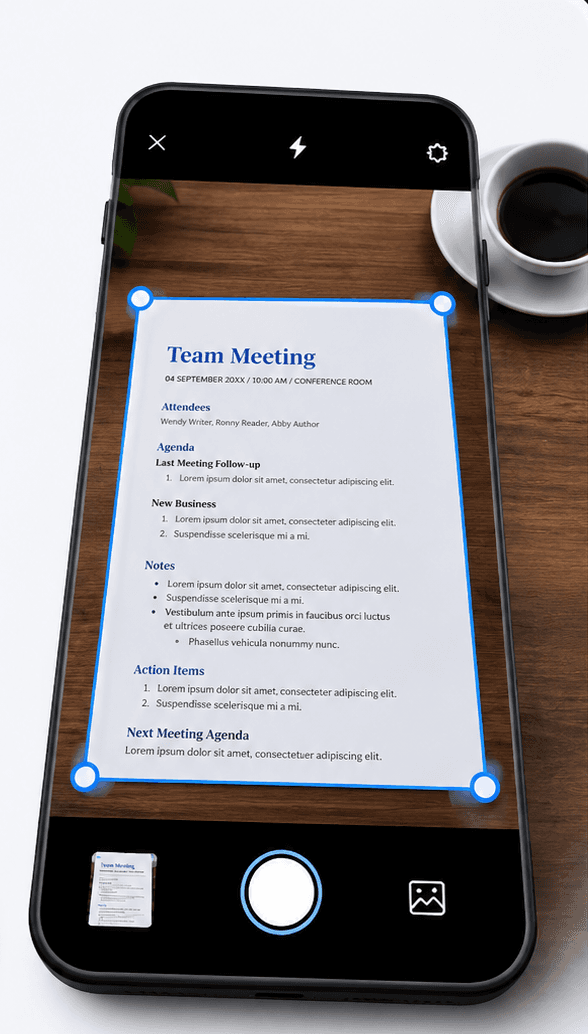
Filex AI document scanner scanning and organizing a document on mobile

Document Scanner

Scan it. Filex AI files it under the right course.

Point your camera at lecture notes, a handout, or an assignment. Filex AI reads it, names it clearly, and files it under the right course โ€” no manual sorting.

  1. 01

    Tap scan and point your camera

    Open Filex AI, tap scan, and point your camera at any notes, handout, or assignment. Then tap organize. That is the whole job.

  2. 02

    AI reads the document

    OCR and content analysis extract what the document actually is: the course, the topic, the dates, the key terms.

  3. 03

    It files itself

    The scan lands in the course folder that fits it โ€” or Filex AI creates one. It gets a clear name built from its content, not "scan_20260114.pdf".

  4. 04

    Find it by asking

    Weeks later, just type "find all my CS101 assignments" or "show notes from week 4". The scan is already indexed, named, and linked.

Browser Extension

Capture lecture slides and readings โ€” right inside Chrome

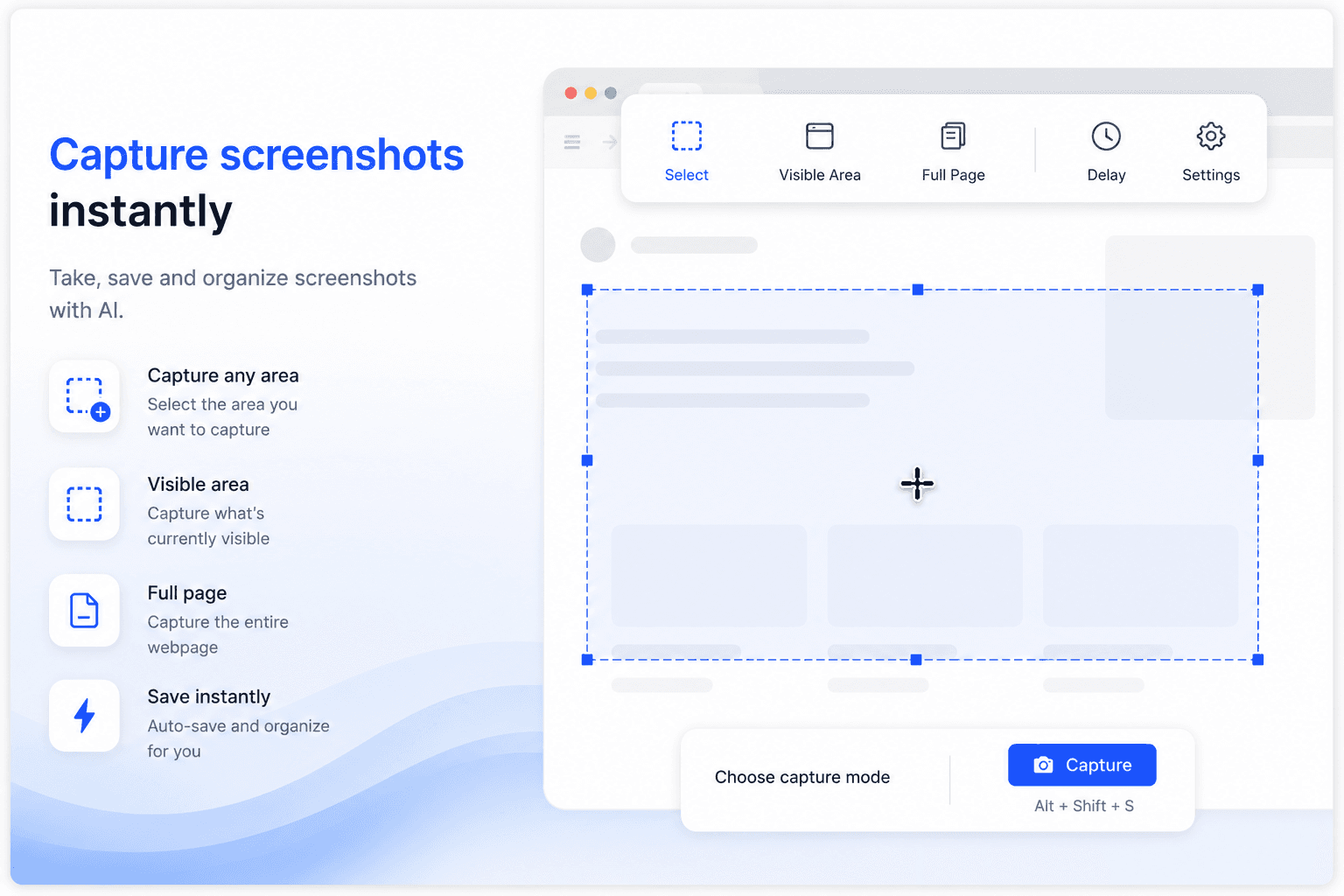
Take, save, and organize screenshots of lecture slides, readings, and study material with AI. Every screenshot you capture and every file you download gets named, sorted by course, and synced automatically โ€” without leaving the tab.

  • Capture any area, the visible area, or a full lecture slide
  • Screenshots auto-saved, named, and filed under the right course
  • Downloads sorted into the right semester folder automatically
  • Full-content search inside notes, readings, and assignments
  • Instant sync to Filex AI on iPhone, Android, and web
Filex AI browser extension capturing and organizing a screenshot

Use cases

Just ask, in plain English

โ€œFind my notes on thermodynamicsโ€

โ€œShow all assignments due this weekโ€

โ€œWhich papers did I cite in my thesis?โ€

โ€œFind the slides from the economics lectureโ€

โ€œShow all research papers on machine learningโ€

โ€œFind my semester 3 study materialโ€

โ€œWhich subjects have pending assignments?โ€

โ€œShow my lab reports from this yearโ€

Smart Grouping & Lenses

Group your study material, your way

Describe a group once โ€” Filex AI keeps it live and up to date automatically.

โ€œGroup all files for CS101โ€

โ€œGroup lecture notes by weekโ€

โ€œCreate a Lens for my thesis researchโ€

โ€œGroup assignments by due dateโ€

โ€œGroup all readings for semester 3โ€

โ€œCreate a Lens for exam prepโ€

โ€œGroup slides by courseโ€

โ€œCreate a Lens for group project filesโ€

Available Everywhere

AI File Organizer for Students โ€” iPhone & Android

iPhone & iPad App

Scan documents, organize files, and search by content on the go. Available on iOS and iPadOS.

Get the app

Android App

Scan documents, organize files, and search by content on the go. Available on Android.

Get the app

Web App

Full-featured workspace in your browser. Organize, search, share, and manage files from anywhere.

Get started

Browser Extension

AI file management directly inside Google Drive, OneDrive, and Dropbox. No tab switching.

Add to Chrome

Comparison

Why switch from manual folders

Everything you do by hand today, Filex AI does automatically the moment a file arrives.

Capability

Filex AI

Manual folders

Auto-organize by subject

Files sorted by subject and content type the moment they arrive

Content-based renaming

Clear names built from subject, date, and topic found inside the file

OCR for scans and photos

Photographed whiteboard notes and scanned handouts become searchable text

Natural language search

Type "find my notes on thermodynamics" and get the exact file

AI Lenses collections

One document can live in many collections at once, with no duplication

Deadline reminders

Assignment due dates pulled from documents automatically

Cross-device sync

Web, iPhone, and Android stay in sync in real time

Encrypted and private

Files encrypted in transit and at rest, never used to train public models

Simple, transparent pricing

Start free. Upgrade only when you need more power.

Free

Start organizing smarter with AI-powered file management.

$0
  • 20 files one time
  • AI content analysis & auto-sorting
  • Smart file renaming
  • Basic tagging
  • Cloud sync across devices
  • Export Organized Folders
Most Popular

Premium

Ideal for professionals who organise files, notes, and projects every day.

$2.99/month
  • 500 files organization per month
  • Advanced subject-based folders
  • OCR for images & scans
  • Handwritten notes analysis
  • Mobile app access
  • Share-to-organize from anywhere
  • Priority support
  • Export Organized Folders
Best Value

Premium (Yearly)

Save more with annual billing

$29/year
  • 6000 files organization per year
  • Advanced subject-based folders
  • OCR for images & scans
  • Handwritten notes analysis
  • Mobile app access
  • Share-to-organize from anywhere
  • Priority support
  • Export Organized Folders

Privacy & security built in

Your files are protected using modern security and privacy best practices

Core Protection

Encrypted by Default

All files and related metadata are encrypted both in transit and at rest using industry-standard encryption methods.

Core Protection

GDPR-Compliant Architecture

Designed in line with GDPR principles including data minimisation, purpose limitation, and user-controlled access.

Core Protection

Limited Processing Scope

Files are processed only during the organisation workflow. Once organisation is completed, files are no longer accessed or processed.

User-Only Data Access

Only you can access your files. We do not sell user data, and files are never used for model training or secondary purposes.

Secure Cloud Infrastructure

Data is stored on hardened cloud infrastructure with strict access controls, auditing, and continuous monitoring.

Security Best Practices

Security controls follow least-privilege access, secure key management, and proactive risk mitigation practices.

What People Are Saying

Join thousands who've revolutionized their file management

๐Ÿ”ดReddit
Iโ€™m a property agent and deal with floor plans, contracts, and client documents every day. This made my files much easier to manage without manual sorting.
P
via Reddit
๐ŸฆX
โœ“ Verified
As a property agent, Iโ€™m constantly downloading agreements and brochures. Finding things quickly before client calls is way less stressful now.
A
via X
๐Ÿ”ดReddit
Iโ€™m a software developer and my Downloads folder was chaosโ€”screenshots, logs, random PDFs. This organised everything better than I expected.
D
via Reddit
๐ŸฆX
โœ“ Verified
I work in marketing and download a lot of decks and reports. This saved me during meetings when I needed files fast.
B
via X
๐Ÿ”ดReddit
Iโ€™m a college student and my notes and PDFs were always scattered. This helped me clean things up without thinking too much.
S
via Reddit
๐ŸฆX
โœ“ Verified
I was a bit worried about privacy at first, but it feels safe. I mostly use it for work documents and research files.
S
via X

Complete guide

The Complete Guide to AI File Management for Students

Why a Folder-Per-Class System Collapses by Midterms

At the start of a semester, a folder per class feels like enough structure. Lecture slides go in one place, assignments in another, and everything is manageable because the volume is still low. By midterms, that structure is straining under the weight of downloaded readings, forwarded PDFs, screenshotted slides taken mid-lecture, and photographed whiteboard notes, all arriving faster than there is time to file them properly. A file named "notes_final_v3.pdf" says nothing about which class or week it belongs to, and the night before an exam is the worst possible time to be guessing.

The deeper issue is that manual filing depends on doing the same small task correctly, every single time, across every class, for an entire semester. Students are not filing clerks, and the moment something more urgent comes up, a due assignment, an exam to study for, filing is the first habit to slip. Those deferred files pile up in Downloads, and by the end of the semester there is an organized core surrounded by a growing pile of unsorted PDFs, screenshots, and photographed notes nobody got around to filing.

AI-based organization removes the dependency on remembering to file consistently. Because Filex AI reads the subject, topic, and document type directly out of each file's content, the hundredth lecture note of the semester gets filed as accurately as the first, whether it was uploaded during week one or the night before finals.

How AI Tells One Class's Notes From Another Without You Naming Anything

A file named "notes_20260114.pdf" or "paper (2).pdf" gives no indication of which subject it belongs to. Filex AI instead reads the actual content, the subject matter discussed, key terms, dates referenced, and the type of document, lecture notes, an assignment brief, a research paper, to determine both what the document is and which class or topic it belongs under.

This matters most for the file types that look identical from the outside. Photographed whiteboard notes from two different classes, or two research papers downloaded for two unrelated assignments, are indistinguishable by filename or format alone. Reading the actual content, the terminology, the subject-specific vocabulary, is what allows Filex AI to separate a thermodynamics lecture from an economics lecture even when both were captured the same way, as a phone photo with a generic filename.

The same extraction is what powers a query like "find my notes on thermodynamics" or "show all research papers on machine learning" returning the exact file, because the search index is built from what each document actually discusses, not from how carefully it was named when it was saved.

Bringing a Semester, or a Whole Degree, of Backlogged Files Into Order

Most students accumulate a genuine backlog well before finals: readings downloaded and never filed, lecture slides screenshotted mid-class, research papers saved for a project that got shelved and never revisited. By the time a thesis or major project rolls around, this backlog can span years and multiple courses, and manually sorting it retroactively is exactly the kind of task that keeps getting deferred because it feels too large to start.

Filex AI processes that backlog exactly as it exists, with no need to pre-sort or rename anything first. Upload everything, mixed subjects, mixed years, mixed formats, phone photos and PDFs together, and each file gets read, matched to the correct subject or topic, and renamed in a single pass. The size of the backlog does not change how it is processed, since each file is evaluated on its own content rather than its position in the pile.

This is especially useful heading into a thesis or capstone project, where pulling together every relevant paper and note from across a multi-year backlog by hand would otherwise take a significant chunk of the research time itself. An AI Lens like "everything for my thesis" can then draw together files from across different subject folders without requiring any of them to be physically moved or duplicated.

Scanning Handouts on Your Phone, Studying From Your Laptop

A lot of student paperwork does not start as a digital file at all. Handouts get passed around in class, whiteboard notes get photographed in the last minute of a lecture, and library materials sometimes only exist on paper. The gap between capturing that material on a phone and actually having it usable for studying on a laptop later is where a lot of it gets lost entirely.

Filex AI is built to close that gap. A photo taken on a phone right after class gets read, categorized under the right course, and is immediately available and searchable from a laptop or any other device, with no manual transfer step in between. The same organized library, whether built from lecture slides downloaded on a laptop or handouts photographed on a phone between classes, stays in sync everywhere, so studying from whichever device is at hand works the same way.

Frequently asked questions

Everything you need to know about using Filex AI

What is AI file and document management for students?

AI file and document management for students uses artificial intelligence to read the content of your study documents, such as lecture notes, assignments, and research papers, and automatically organize them by subject and semester, rename them consistently, and make them searchable in natural language. Instead of manually creating folders per class, the AI builds and maintains the structure for you.

How does Filex AI organize lecture notes and assignments?

Filex AI reads each document using OCR and AI content analysis, extracts key details like subject, topic, and date, then groups files by class. Files are renamed with a clear pattern like 2026-03_Thermodynamics_Week5-Notes.pdf so they stay identifiable everywhere.

Can I search my notes by topic?

Yes. Filex AI supports natural language search, so you can type queries like "find my notes on thermodynamics" or "show all research papers on machine learning". Because the AI indexes document content, not just filenames, it finds the right file even if it was originally named notes_20260114.pdf.

Is Filex AI free for students?

Yes. Filex AI has a free Spark plan that is ideal for students organizing notes and papers across a semester. No credit card is required to get started.

Can it help me organize research for my thesis?

Yes. You can create an AI Lens for your thesis that pulls in every relevant paper and note, even if those same files also belong to a subject folder. One paper can exist in multiple collections at once.

Does it work with photographed whiteboard notes?

Yes. Filex AI uses OCR to read photographed whiteboard notes, scanned handouts, and screenshotted slides, turning them into fully searchable text documents.

Will it remind me about assignment deadlines?

Yes. Filex AI extracts due dates from assignment documents automatically, so you can see upcoming deadlines across all your subjects in one place.

Do I need to rename or sort files before uploading?

No. Upload files exactly as they are. Messy names, scans, photos, and mixed formats are all fine. The AI reads the content and handles the naming, grouping, and categorization for you.

What are AI Lenses and how do they help students?

AI Lenses let you group documents using natural language instead of folders. You can create collections like "everything for my thesis", "semester 3 material", or "exam prep", and a single file can appear in multiple lenses at once without duplication.

Can it organize notes and readings for a group project shared with classmates?

Yes. Files shared or uploaded for a group project can be organized into their own AI Lens, like "group project files", so contributions from different sources stay collected in one searchable place without manual folder coordination.

Does it help find citations and sources when writing a paper?

Yes. Because Filex AI reads the content of every research paper and PDF you save, you can search by topic or author across your whole library, which makes it easier to relocate a source you remember reading but did not carefully file at the time.

Can I keep notes organized separately for each semester or academic year?

Yes. Filex AI detects the subject and date context inside your notes and assignments, and you can layer AI Lenses like "semester 3" or "2026 spring term" on top of that to view a specific period without moving or duplicating any files.

Put your study material on autopilot

Join students who let AI handle the filing. Free to start, no credit card required.