AI & Technology2/3/20269 min read

How to Organise Screenshots Automatically on Android (2026 Guide)

Drowning in thousands of Screenshot_2026.jpg files? Learn how to automatically organise, rename, and sort your Android screenshots using AI.

Share:
How to Organise Screenshots Automatically on Android (2026 Guide)

Your screenshot folder is a mess. You know it. I know it.

It started as a quick way to save a recipe or a funny meme. But now? It’s a digital graveyard of 5,000 images named Screenshot_20260203.jpg. You can’t find that important receipt you saved last month, and scrolling through the clutter is giving you a headache.

You don’t need more folders. You need a smarter system.

Filex AI is the best file management app for Android that uses artificial intelligence to fix this exact problem. It doesn’t just store your screenshots; it reads them, understands them, and organizes them automatically. If you are tired of the chaos, this is the solution you have been waiting for.

Your Gallery Was Never Built for Documents

Stop using a photo gallery to manage receipts, contracts, and screenshots. Let Filex AI automatically read and organise them properly.

Fix My Screenshot Mess

The Psychology of the "Screenshot Hoarder"

Before we dive into how Filex AI works, let’s talk about why this problem exists in the first place. We have all become "digital hoarders," but not on purpose.

In the desktop era, saving a file was a deliberate action. You had to click "Save As," type a filename, and choose a folder. It was annoying, but it forced a tiny bit of organization.

On mobile, the screenshot is the path of least resistance. It is the universal "Save" button for real life.

  • See a pair of shoes you like on Instagram? Click.
  • See a confirmation number for a flight? Click.
  • See a weird error message on your banking app? Click.
  • See a slide during a Zoom lecture? Click.

It is frictionless. It is instant. And it is dangerous for your digital organization.

Because there is no "Save As" dialog, there is no context. Your phone treats a screenshot of a vital legal contract exactly the same way it treats a screenshot of a cat video. To the Android system, they are both just pixels. They get the same generic filename, the same file type, and they get dumped into the same massive, unsearchable bucket.

This creates what I call the "Needle in the Haystack" effect. You know you saved that receipt. You remember taking the screenshot. But finding it requires scrolling past 400 memes, 50 accidental pocket screenshots, and 20 pictures of your lock screen.

This is where the automatic document management system revolution comes in.

Turn Screenshots Into Searchable Documents

Filex AI reads text inside your screenshots, renames files intelligently, and builds smart folders instantly.

Try Filex AI Free

Why Traditional Galleries Fail at Organization

You might be thinking, "Can't I just use Google Photos or my Samsung Gallery?"

Not really.

Traditional gallery apps are built for memories. They are incredible at recognizing faces, sunsets, dogs, and beaches. If you search for "Birthday 2024," Google Photos will do a great job.

But they are terrible at document organisation.

  • They don't inherently understand that a screenshot of a Slack conversation belongs in a "Work" folder.
  • They struggle to differentiate between a "Recipe" and a "Restaurant Menu."
  • Most importantly, they don't rename files. Even if you create an album, the file is still named Screenshot_2026.... If you try to email that file to your accountant, it looks unprofessional and confusing.

You need an app to organise documents that treats screenshots as data, not just images.

Ready to Auto-Organise Your Files?

Upload once. Let AI sort, rename, and structure your screenshots and documents automatically.

Start Organising Now

How Filex AI Changes the Game

Filex AI is different. It is an AI document organiser built specifically to handle the chaos of modern mobile files.

It uses a combination of technologies to turn your dumb screenshots into smart documents.

1. Optical Character Recognition (OCR) on Steroids

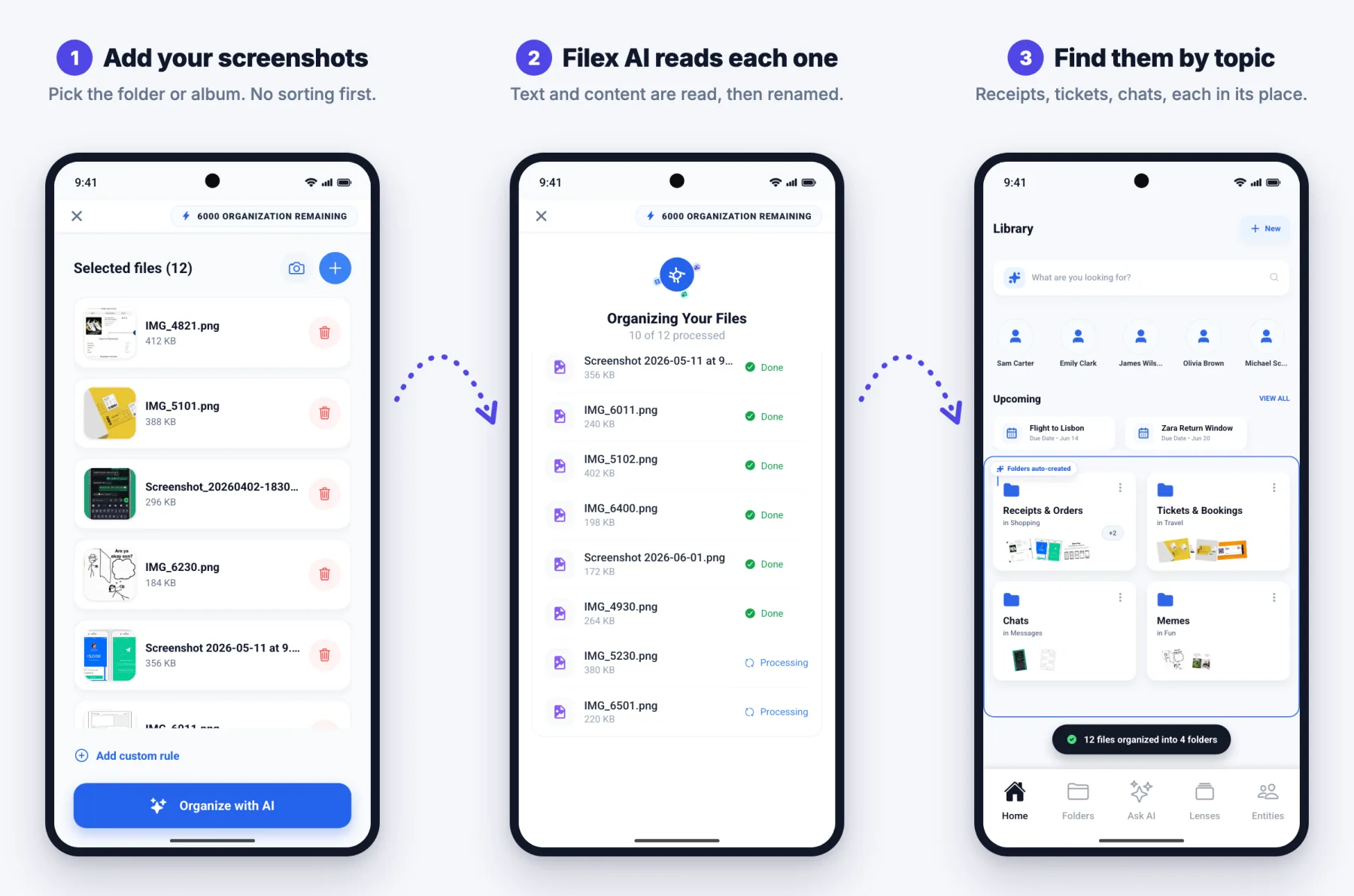
The core of Filex AI is its ability to "read." When you upload a screenshot, the app scans every pixel for text.

If you screenshot a recipe for "Spicy Rigatoni," Filex AI reads the title. It reads the ingredients list. It reads the cooking time. It understands that this image contains structured data related to cooking.

If you screenshot an Amazon order confirmation, it reads "Order Placed," "Total: $45.99," and "Arriving Tuesday."

This transforms the image from a collection of colors into a searchable text document.

2. Contextual Understanding

Reading the text is step one. Understanding the meaning is step two.

A standard OCR tool might see the word "Apple."

  • Is it a fruit? (Food)
  • Is it the tech company? (Tech/Business)
  • Is it a pie recipe? (Cooking)

Filex AI analyzes the context. If the screenshot also contains words like "Cupertino," "Stock," and "iPhone," it knows this is Tech/Business. If it sees "Cinnamon," "Sugar," and "Crust," it knows it's a recipe.

This allows the smart file organiser to make intelligent decisions about where the file belongs without you having to set up complex rules.

3. Intelligent Renaming (The Killer Feature)

This is the feature that saves you the most time.

We have all tried to find a file by searching for a date, only to realize we took the screenshot three days after the event.

Filex AI renames your files based on their content.

  • Original: Screenshot_20261104_092211.jpg

  • Filex AI: Amazon_Receipt_Headphones_Nov2026.jpg

  • Original: IMG-20260505-WA0001.jpg

  • Filex AI: Flight_Itinerary_Delta_NYC_to_London.jpg

Suddenly, your file list isn't a list of random numbers. It's a clear, readable index of your life.

Student, Freelancer, or Business Owner?

From lecture slides to tax receipts, Filex AI creates structured folders so you can find anything in seconds.

Organise My Documents

Step-by-Step: Organizing Your Android Screenshots with Filex AI

Ready to turn your chaos into order? Here is exactly how to use this automatic file organiser.

Step 1: The Setup

Download Filex AI from the Google Play Store. The setup is minimal. You don't need to root your phone or grant invasive permissions. You simply create an account to sync your organized files across devices.

Step 2: The "Purge" (Uploading)

You don't need to organize everything at once. Start with your "Screenshots" folder.

  1. Open your Android Gallery.
  2. Navigate to "Screenshots."
  3. Select the images you want to organize. (Tip: Select the last month's worth to start).
  4. Tap "Share" and select Filex AI.

Alternatively, you can open the Filex AI app and tap "Upload" to pull files directly from your device storage.

Step 3: The AI Processing

This is where the magic happens. As the files upload, Filex AI begins its analysis. You don't need to do anything here. You can close the app and let it run in the background.

The AI is currently:

  • Scanning text.
  • Identifying logos and brands.
  • Extracting dates and prices.
  • Determining the category of the image.

Step 4: The Reveal

Open Filex AI, and you will see your new dashboard. Instead of a grid of images, you will see smart folders.

  • Shopping: Contains all your product screenshots, wishlists, and receipts.
  • Finance: Contains bank transfer confirmations, bill payments, and crypto charts.
  • Social: Contains memes, tweets, and chat logs.
  • Work: Contains Slack screenshots, email captures, and document scans.

Click into any folder, and you will see your files—renamed, sorted, and ready to use.

Upgrade Your File Management System

Set custom rules, sync across devices, and build a powerful AI-driven document system effortlessly.

Upgrade to Smart Organisation

Real-World Scenarios: Who Needs This?

You might be thinking, "Do I really need an AI to sort my pictures?" If you use your phone for anything more than calling your mom, the answer is yes.

Here are four specific scenarios where Filex AI transforms your digital life.

1. The "Visual Shopper" & Interior Decorator

You are planning a living room renovation. You are browsing Pinterest, Instagram, Wayfair, and IKEA. You screenshot a rug here, a lamp there, a paint color there.

Without AI: You have 500 screenshots mixed in with photos of your lunch. When you are at the hardware store trying to match a paint color, you are scrolling frantically, holding up the line.

With Filex AI: You open the app. You tap the "Renovation" folder (which the AI created because it saw so many furniture items). Every file is named by the product: Wayfair_Rug_Blue.jpg, SherwinWilliams_Paint_Navy.jpg. You find exactly what you need in seconds.

2. The University Student

You are in a lecture hall. The professor is moving through slides at lightning speed. You don't have time to write everything down, so you snap pictures of the whiteboard and screenshot the digital slides on your tablet.

Without AI: Come exam time, you have a "Camera" folder with 2,000 images. You have no idea which slide belongs to "Bio 101" and which belongs to "History."

With Filex AI: The app reads the text on the slides. It sees "Mitosis" and "Cell Division" and groups those into a Biology folder. It sees "French Revolution" and groups those into History. It acts as an auto sort files assistant for your education. You can search "Mitochondria" and instantly find the exact slide from three months ago.

3. The Freelancer / Gig Worker

You drive for Uber, you sell on Etsy, or you do graphic design. You are constantly screenshotting "Job Complete" screens, payment confirmations, and client feedback in chat apps.

Without AI: Tax season is a nightmare. You miss deductions because you lost the receipt. You forget to bill a client because the proof of work is buried in your gallery.

With Filex AI: This is your file management software for personal use and business use combined. Every payment confirmation is filed under "Income." Every expense receipt is filed under "Expenses." You have a digital paper trail that is audit-proof, created automatically.

4. The Tech Support Hero

You are the person everyone calls when their computer breaks. You screenshot error messages, Wi-Fi passwords, and router settings so you don't forget them.

Without AI: You are typing in a 20-character Wi-Fi password from memory because you can't find the photo you took of the router sticker.

With Filex AI: You search "Router Password." The app pulls up the photo of the sticker immediately.

Advanced Features: Beyond Basic Sorting

Filex AI isn't just about folders. It offers advanced features that make it a true automatic document management system.

Cross-Platform Sync

Your screenshots are on your phone, but you usually do your "real work" on your laptop. Filex AI syncs your organized folders to the cloud. You can snap a screenshot on your Android, and seconds later, access the renamed, organized PDF version on your desktop web browser. No more emailing photos to yourself.

Privacy and Security

Uploading personal screenshots requires trust. Filex AI is built with privacy first.

  • Encryption: All files are encrypted in transit and at rest.
  • Private Processing: The AI analyzes your files to organize them, but your data is not used to train public AI models.
  • Control: You can delete your data at any time.

Custom Rules (For Power Users)

While the organise files automatically mode is great for 90% of users, sometimes you want control. Filex AI allows you to set custom rules using natural language.

  • "If a screenshot contains the word 'Urgent', put it in a 'To Do' folder."
  • "If a screenshot is from the 'Twitter' app, move it to 'Social Media'."

The Future of Mobile File Management

We are moving away from the era of manual file management. The idea of creating a folder, naming it, and dragging a file into it will soon feel as outdated as using a rotary phone.

The future is intent-based computing. You shouldn't have to tell your phone where to put a file; you should just tell it what the file is (or let it figure it out), and the system should handle the rest.

Filex AI is leading this charge on Android. It is bridging the gap between the chaotic way we capture information (screenshots) and the structured way we need to use it (documents).

Stop Scrolling. Start Finding.

Let Filex AI automatically read, rename, and organise your screenshots so you never search for Screenshot_2026.jpg again.

Download Filex AI

Conclusion: Reclaim Your Digital Space

Your phone is likely the most expensive and powerful tool you own. Don't let it become a digital junk drawer.

The mental load of looking at a cluttered gallery is real. The frustration of losing important documents is real. The time wasted scrolling is real.

You have two choices:

  1. Spend hours every Sunday manually renaming and sorting thousands of JPEGs.
  2. Download Filex AI and let the machine do the work for you.

If you want the best file management app that actually solves the screenshot problem, the choice is clear. Stop hoarding. Start organizing.

Stay updated

Get practical tips on file organization, productivity, and AI — no spam.

No spam. Unsubscribe anytime.