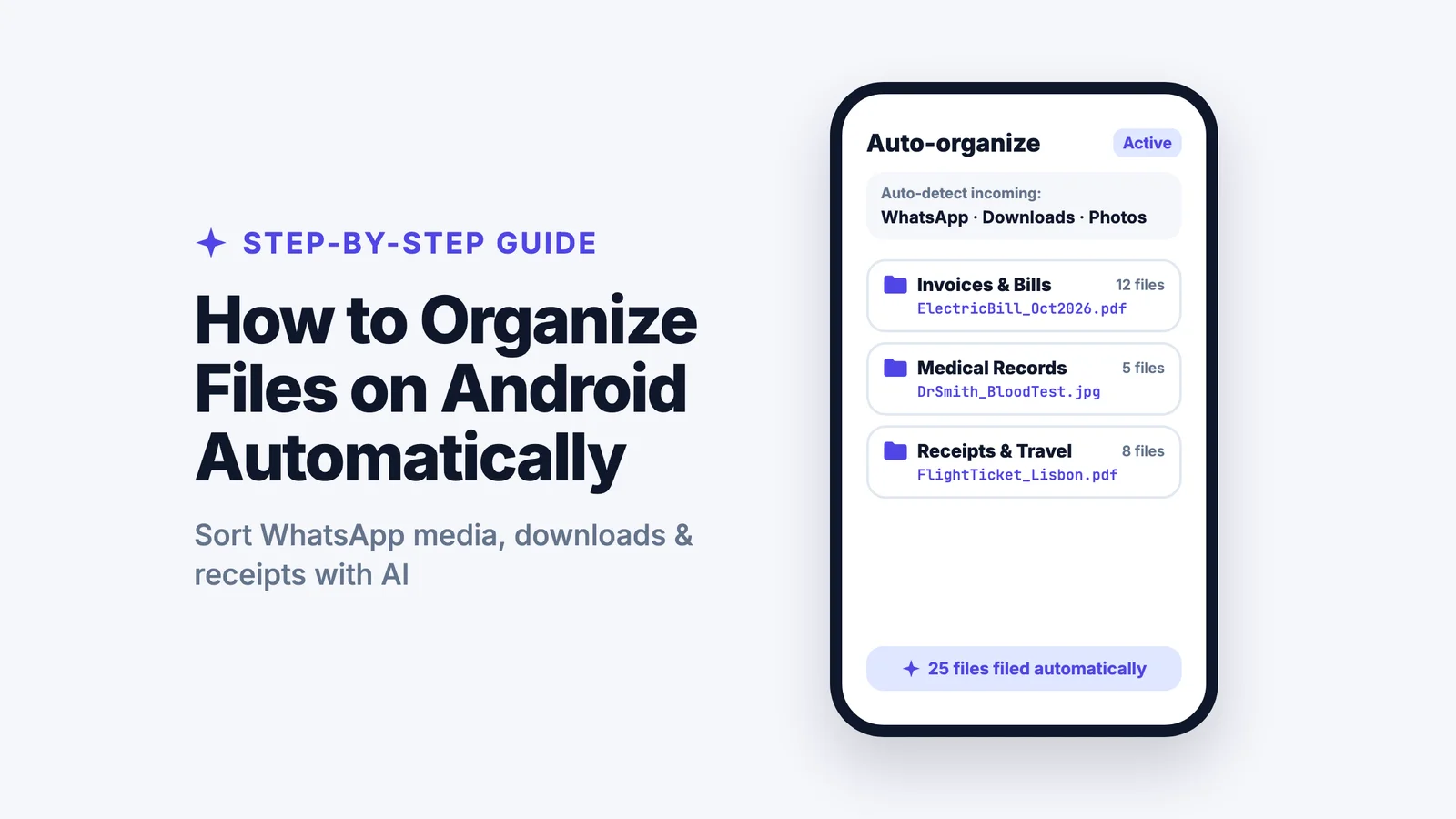
Your Android phone is drowning in files. Downloads folder with 800+ files. WhatsApp media scattered everywhere. Screenshots with names like "IMG_20260115_143052.jpg". PDFs named "document (17).pdf" that you can't find when you need them.
I know this feeling way too well. Last week, I spent 20 minutes looking for a contract I downloaded from email. Turned out it was buried in Downloads, mixed with 400 other files, named something completely unhelpful.
If you're tired of scrolling endlessly through your Files app looking for that one important document, you're definitely not alone. The average Android user has over 500 files on their device. Most of us have just given up on organizing them.
But here's the thing. Your Android phone can organize files automatically now. No more manual sorting. No more cryptic filenames. No more wasted time.
AI file organizer Android apps have changed everything about mobile file management. Instead of spending hours manually creating folders and dragging files around on a 6 inch screen, you upload your files to an AI system that organizes everything for you.
Let me show you exactly how this works.
Let AI sort your phone's files
Add your downloads, WhatsApp files and screenshots, and Filex AI puts each one in the right folder with a clear name. Your first 10 files are free.
Try Filex AI FreeWhy Traditional File Organization Fails on Android
Before I explain the AI solution, let's talk about why the old way doesn't work anymore.
Think about your daily file chaos:
Your files come from everywhere Email attachments download automatically. WhatsApp saves media to its own folder. Telegram puts downloads somewhere else entirely. Screenshots pile up in your Camera folder. Browser downloads land in Downloads. Every app saves files in different directories.
You'd literally need to check 5+ different locations just to find all your files. Who has time for that?
The filenames make no sense WhatsApp names everything like "IMG_20260115_WA0045.pdf". Screenshots become "Screenshot_20260115_142019.jpg". Downloads get called "document (17).pdf". Email attachments? "attachment_final_v3.pdf".
I opened my Downloads folder yesterday. Saw a file called "document_scan_099.pdf". No idea what it was. Had to open it to find out. It was my electric bill from last month.
These names tell you absolutely nothing about what's actually inside.
Organizing on mobile is painful Have you ever tried creating folders on a phone? Dragging dozens of files one by one on a touchscreen? Typing descriptive names with your thumbs?
Yeah. Nobody does that. Because it's terrible.
Basic file managers don't help The built in Files app on your phone? It just shows you the mess. It doesn't organize anything. At best, it groups files into "Documents", "Images", "Videos".
That doesn't solve the problem. It just moves the chaos into slightly different piles.
The solution? AI document organizer Android apps that actually do the work for you.
What Is an AI File Organizer for Android?
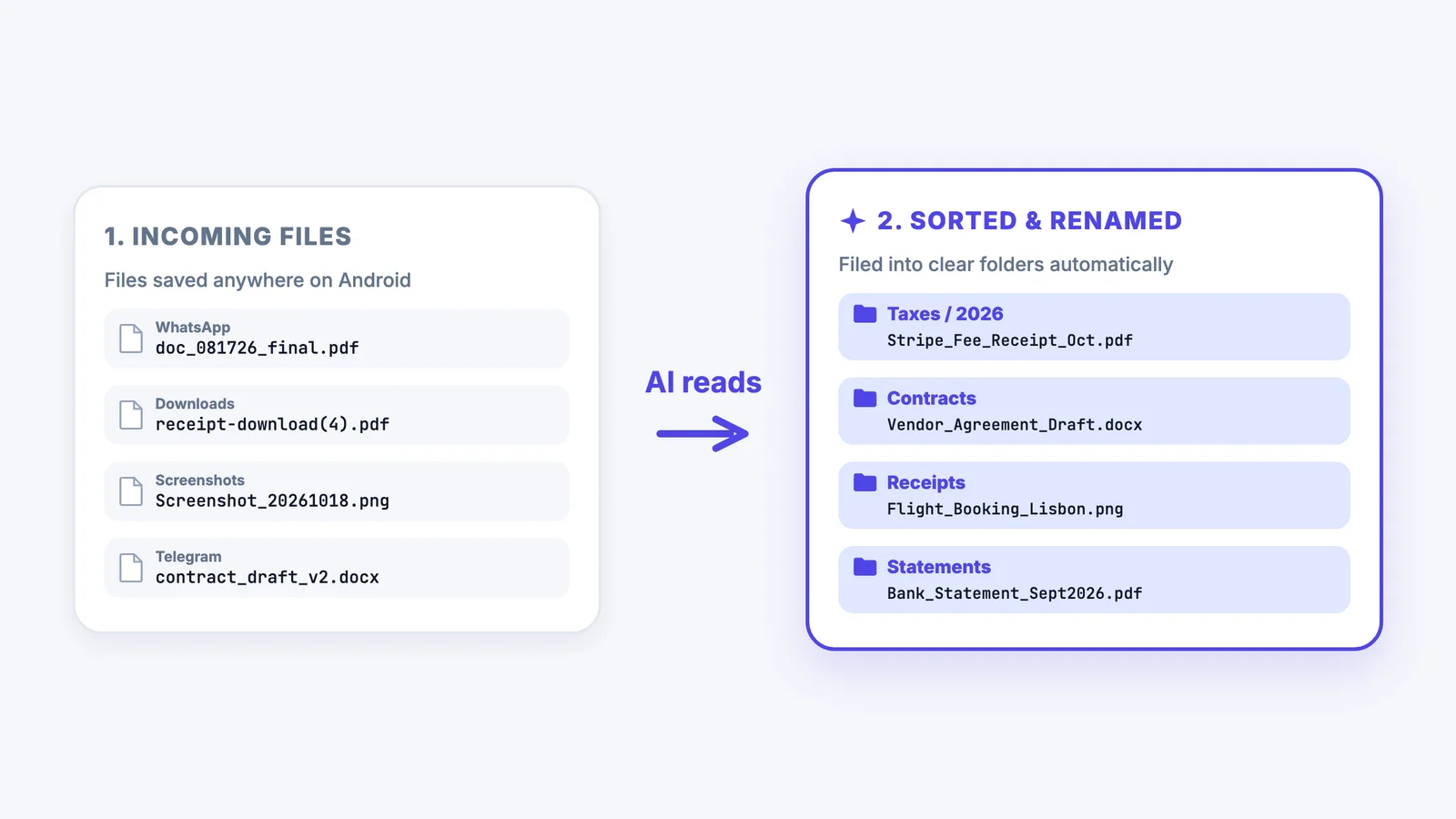
An AI file organizer Android app uses artificial intelligence to:
- Read and understand file content (not just filenames)
- Create smart folder structures based on your needs
- Rename files with descriptive, meaningful names
- Organize files from all sources automatically
- Maintain organization without manual work
- Work intelligently even without custom rules
Instead of you telling your phone where each file goes, you upload files to the AI system. You can either set rules in plain English or let the AI organize everything automatically based on intelligent analysis of your files.
Example with custom rules:
You say: "Organize invoices by vendor and put them in Finance folder with dates"
AI does: Reads all your PDFs, identifies invoices, extracts vendor names and dates, creates organized structure automatically
Example with automatic organization:
You do: Upload files and enable auto-organize
AI does: Analyzes all your files, understands their purpose (receipts, contracts, photos, documents), creates logical folder structures, and renames everything intelligently
This is the future of document organizer Android functionality, and it's available right now.
Step-by-Step: How to Organize Files Automatically on Android Using AI
Step 1: Download an AI File Organizer App
The first step is getting an intelligent file organizer Android app that actually uses AI to understand your files.
Download Filex AI: Get Filex AI for Android
Filex AI is the leading AI file organizer Android app that reads file content, creates smart folders, and renames files automatically based on rules you set.
Why Filex AI:
- Truly understands file content using AI
- Works with files from WhatsApp, Telegram, Downloads, everywhere
- Organizes automatically in background
- Lets you set rules in plain English
- Syncs across devices (phone, tablet, web)
- Free credits to start
Step 2: Install and Set Up
- Install the app from Google Play Store
- Open Filex AI on your Android phone
- Sign up with your email (takes 30 seconds)
You'll receive free credits to organize hundreds of files and see the AI in action.
Step 3: Choose Your Organization Method
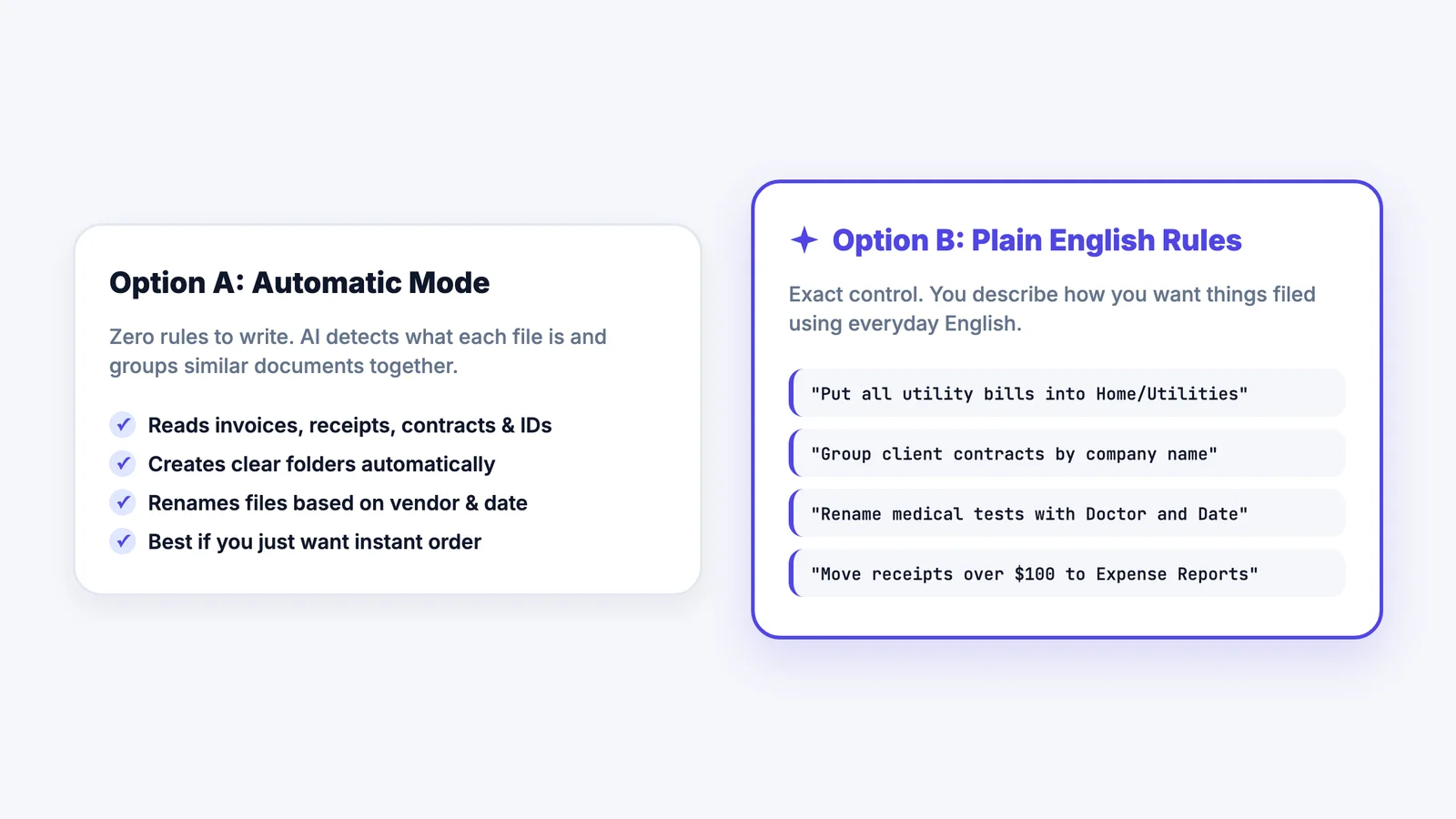
AI file organizer Android apps like Filex AI offer two approaches:
Option A: Define Custom Rules (Recommended for Specific Workflows)
Tell the AI exactly how you want files organized in plain English.
Examples of organization rules:
For Students:
"Organize my files by course name and semester. Inside each course, create folders for Lectures, Assignments, and Study Notes. Rename files to include course code and topic name."
For Property Managers:
"Create folders for each property by address. Inside each property, organize into Leases, Maintenance, and Invoices. Rename files to show property name, unit number, and date."
For Small Business Owners:
"Organize by client name. Inside each client folder, separate invoices, contracts, and receipts. Rename files to include client name, document type, and date."
For Freelancers:
"Create folders for each project. Organize by file type - contracts, deliverables, invoices, communication. Rename everything to show project name and category."
Option B: Let AI Organize Automatically (No Rules Needed)
Don't want to think about organization rules? Just use automatic mode and the AI document organizer Android app will:
- Analyze all your files - Reads content to understand what each file is
- Identify categories - Recognizes invoices, receipts, contracts, photos, documents, study materials, work files
- Create logical structure - Builds folder hierarchy that makes sense based on your actual files
- Rename intelligently - Transforms cryptic names into descriptive ones
- Group related files - Puts similar content together automatically
The AI learns from your files and creates an organization system tailored to your specific needs without you defining any rules.
When to use automatic organization:
- You're not sure how you want files organized
- You have diverse file types that are hard to categorize
- You want the AI to figure out the best structure
- You prefer set-it-and-forget-it approach
When to use custom rules:
- You have specific workflow requirements
- You manage files professionally (property management, freelancing, business)
- You want precise control over folder structure
- You have consistent file types coming in regularly
Most users start with automatic organization to see what the AI creates, then refine with custom rules if needed.
Step 4: Upload Your Files to Filex AI
This is the key step. Since Filex AI is a cloud-based AI organizer, you need to upload the files you want organized.
How to upload files:
Option 1: Upload from Downloads Folder Open your Downloads folder, select the files you want organized, and share them to Filex AI. The AI will process and organize them.
Option 2: Upload WhatsApp Media Navigate to your WhatsApp folder, select the PDFs, images, and documents you want organized, and upload them to Filex AI.
Option 3: Upload Specific File Types Start with just invoices, or just work files, or just study materials. Select those files from anywhere on your phone and upload them to Filex AI.
Option 4: Bulk Upload Select multiple folders or all your important files at once and upload everything. The AI will sort through it all based on your organization method (custom rules or automatic).
Why upload instead of direct access: Filex AI works as a secure cloud service, which means your files are encrypted, accessible across devices, and organized in one central place. Upload once, access anywhere.
Step 5: Let the AI Work Its Magic
Once you've uploaded files and chosen your organization method (custom rules or automatic), the AI gets to work:
The AI reads each file's actual content:
- Opens PDFs and reads text inside
- Analyzes images and screenshots
- Examines Word documents and spreadsheets
- Extracts key information like dates, names, topics, categories
Creates smart folder structure: Based on your custom rules OR intelligent automatic analysis, builds organized folder hierarchy that makes sense for your specific needs, not generic categories.
Renames files intelligently: Transforms cryptic names into descriptive ones
Before:
- IMG_WA0045.pdf
- document_scan_099.pdf
- Screenshot_20260115_142019.jpg
- invoice_march_finalv3.pdf
After:
- ElectricBill_March2026.pdf
- ClientABC_Contract_2026-01-15.pdf
- BankConfirmation_PaymentReceived_2026-01-15.jpg
- VendorXYZ_Invoice_2026-01-20.pdf
See the difference? Every filename now actually describes what's inside. You can find things at a glance.
Maintains organization automatically: From now on, every new file you download or receive gets automatically organized according to your rules. No manual work required ever again.
I set up my organization rules once, three weeks ago. Haven't manually sorted a single file since then. Everything just lands in the right place with a clear name. It's honestly amazing.
Step 6: Search and Access Files Naturally
Now that files are organized, finding them is instant.
Natural language search:
- "Find invoice from March"
- "Show me contract with Baker Street"
- "Where's that receipt from Amazon"
- "Find my biochemistry lecture notes"
The AI file organizer Android app understands what you mean and shows relevant files instantly—even if you can't remember exact filenames.
Browse organized folders: Or just browse your newly organized folder structure where everything makes logical sense and has clear names.
Step 7: Share Files Directly from Messaging Apps
Here's a killer feature of Filex AI as a document organizer Android solution:
When you receive files through WhatsApp or Telegram:
- Long-press the file in chat
- Tap "Share"
- Select "Filex AI"
- File automatically uploads and gets organized based on your rules
No more files lost in chat history. Everything uploads to Filex AI and lands in the right place with the right name automatically.
Example:
Group project mate sends research PDF via WhatsApp. You share to Filex AI. It uploads and gets automatically sorted into "Group Project Marketing > Research" with clear filename.
Real-World Examples: AI File Organization on Android
Let's look at specific scenarios where AI document organizer Android apps transform file management.
Example 1: Student Organizing Course Materials
Let me tell you about Sarah. She's a biochemistry major juggling five courses this semester.
Before AI organization: Her phone was a disaster. 400+ files scattered across Downloads, WhatsApp, Telegram. Lecture slides named "Week5.pdf" with no indication which course. Assignment files called "document (12).pdf". Study notes from classmates with names like "IMG_WA0087.pdf".
She told me she spent 30 minutes before every exam just trying to find the right lecture notes. Sometimes she'd give up and ask classmates to resend files she already had somewhere on her phone.
After using Filex AI: All her files now live in organized course folders:
- BIOCHEM301/Lectures/Week5_MetabolismPathways.pdf
- HIST102/Assignments/MidtermEssay_Renaissance.pdf
- ECON101/StudyNotes/SupplyDemand_ChapterSummary.pdf
Now she searches "biochemistry lectures metabolism" and gets instant results. Exam prep went from 30 minutes of file hunting to 2 minutes of finding materials and 2 hours of actual studying.
Her words: "I can't believe I wasted so much time before this."
Download Filex AI to organize your study materials automatically.
Example 2: Property Manager on the Go
My friend Jake manages eight rental properties from his phone. He's constantly dealing with tenant requests, contractor invoices, and maintenance issues.
Before AI organization: Tenant photos from WhatsApp mixed with contractor invoices. Lease agreements named "scan_final_NEW.pdf" with zero indication which property. Inspection reports scattered everywhere. Maintenance requests buried in chat history.
When tenants called with questions, he couldn't find their documents. Made him look unprofessional. Stressed him out constantly.
After using Filex AI: Everything now organizes automatically by property:
- BakerStreet/Unit4B/Lease_Johnson_2026-03.pdf
- OakAvenue/Maintenance/Plumbing_Invoice_2026-01-15.pdf
- PineRoad/Inspection/FireSafety_Certificate_2026-02.pdf
When a tenant from Baker Street calls, he searches "Baker Street Unit 4B" and instantly pulls up their lease, maintenance history, everything. Looks professional. Feels in control.
He says it changed how he works. No more scrambling. No more apologizing for delays while he searches for documents.
Get Filex AI on Google Play for automated property document management.
Example 3: Freelancer Managing Client Work
I actually use Filex AI myself for freelance projects. Before this? Absolute chaos.
Before AI organization: Client files from email, Slack, WhatsApp all mixed together. Invoices named "invoice_march.pdf" with no client name. Contracts scattered across three different chat apps. Receipts lost somewhere in Downloads.
I once spent an entire afternoon recreating an invoice because I couldn't find the original. The client had already paid it. I just needed a copy for my records.
Embarrassing.
After using Filex AI: My client work now looks professional:
- ClientABC/Contracts/ServiceAgreement_2026-01-10.pdf
- ClientABC/Invoices/Invoice_Jan2026.pdf
- ClientXYZ/Deliverables/WebsiteDesign_Final.pdf
- Expenses/OfficeSupplies_Receipt_2026-01-12.pdf
File comes in through Telegram? I share it to Filex AI. It uploads and organizes automatically. Search "ClientABC invoice" and I get every invoice instantly.
My billing process used to take hours. Now it takes minutes.
Install Filex AI to manage client files automatically.
Example 4: Small Business Owner Tracking Everything
My sister runs a small bakery. She handles invoices, receipts, contracts, tax documents. All from her phone while managing the actual bakery.
Before AI organization: Business receipts mixed with personal files. Vendor invoices scattered between email and WhatsApp. Important contracts buried in Downloads somewhere. Tax documents? Good luck finding those come tax season.
Every quarter when she did accounting, she dreaded it. Knew she'd spend days hunting for receipts and invoices.
After using Filex AI: Her business files actually make sense now:
- Finance/Receipts/VendorName_Date.pdf
- Finance/Invoices/ClientName_InvoiceNumber_Date.pdf
- Legal/Contracts/VendorName_Contract_Date.pdf
- Taxes/2026/Q1_Expenses.pdf
Every receipt automatically gets sorted and renamed. She searches "Q1 expenses" and gets a complete list instantly.
Last quarter's accounting? Done in a few hours instead of three days. She actually beat the deadline with time to spare.
Why Filex AI Is the Best AI File Organizer for Android
When searching for a document organizer Android solution, here's why Filex AI stands out:
1. True AI Content Understanding
Unlike basic file managers that only read filenames, Filex AI actually opens and reads your uploaded files to understand content. This enables intelligent organization based on what files actually are, not what they're named.
2. Automatic Organization Without Rules
Don't want to define organization rules? Filex AI can analyze your uploaded files and create intelligent organization structure automatically. Just enable auto-organize and let the AI figure out the best structure for your files.
3. Plain English Organization Rules (When Needed)
When you do want specific organization, no complex settings or coding required. Just tell Filex AI what you want in normal language, and it understands and executes perfectly.
4. Multi-Source File Upload
Upload files from everywhere:
- Downloads folder
- WhatsApp media
- Telegram files
- Email attachments
- Screenshots
- Camera photos
- Any file source on your Android device
5. Intelligent Automatic Renaming
Transforms cryptic filenames into descriptive, searchable names that actually tell you what each file contains.
6. Cloud-Based Organization
Once uploaded, files are organized in the cloud. Access your organized files from any device: phone, tablet, laptop, or web browser. One system, everywhere.
7. Natural Language Search
Find files by describing what you're looking for, not by remembering exact filenames. Search works on file content, not just names.
8. Messaging App Integration
Share files directly from WhatsApp, Telegram, or any app to Filex AI for instant upload and organization. No manual filing required.
9. Custom Workflow Organization
Creates folder structures that match YOUR specific needs, not generic categories. Property managers get property-based organization. Students get course-based organization. Freelancers get client-based organization.
10. Secure & Private
Files are encrypted during upload and storage. Your data stays private. You maintain full control over your documents.
Ready to organize your Android files automatically?
Download Filex AI from Google Play Store and experience intelligent file organization that works with or without custom rules.
How AI File Organization Saves Time and Money
Let me break down the real numbers here, because this isn't just convenient. It's actually saving you money.
Time Savings: Studies show the average person spends 2.5 hours per week searching for files. That's not an exaggeration. Track your own time next week and you'll see.
That adds up to 130 hours per year wasted just looking for stuff you already have.
If your time is worth $25 an hour (probably worth more, honestly), that's $3,250 in lost productivity every single year.
AI organization cuts that search time by 90% or more. Automatic organization means zero setup time. You're literally getting back weeks of your life.
Business Benefits: Faster responses to clients. No more "let me get back to you, I need to find that document." Better client service through instant file access. You look more professional, more organized, more on top of things.
Tax prep and accounting become way less painful when everything is already organized.
Student Benefits: More time actually studying instead of hunting for lecture notes. Better exam prep with organized materials. Less stress knowing exactly where everything is.
The automatic organization works even if you don't create custom rules. Just upload files and let the AI figure it out.
Personal Benefits: Less frustration in daily life. Cleaner digital workspace. Ability to find important documents the moment you need them.
Peace of mind knowing everything is organized without you having to think about it. That set it and forget it convenience is genuinely life changing.
AI File Organizer Android: Free vs. Paid Features
Most AI document organizer Android apps, including Filex AI, offer both free and premium options:
Free Features (Filex AI):
- Free credits to organize hundreds of files
- AI content reading and understanding
- Smart folder creation
- Automatic file renaming
- Natural language search
- Share from messaging apps
- Basic organization rules
Premium Features:
- Up to 500 files organized a month
- Advanced organization rules
- Priority AI processing
- Extended file history
- Premium support
- Cross-device sync
- Advanced search capabilities
Getting Started:
Start with free credits to see how AI organization works for you. Most users find the time savings worth upgrading to premium.
Try Filex AI Free - No credit card required
Getting Started: Organize Your Android Files Today
Alright, here's how to actually do this:
Upload Your Files: Select files from Downloads, WhatsApp, wherever. Upload them to Filex AI.
Choose Your Approach:
- Automatic mode: Enable it and let AI figure out the best organization
- Custom rules: Tell the AI exactly how you want files organized
I started with automatic mode. Let it organize a few hundred files. Then added some custom rules for specific file types. Worked perfectly.
Let AI Organize:
The AI processes your uploaded files and creates the organized structure.
Enjoy Organized Files:
Access your files from any device. Phone, laptop, tablet. Never waste time searching again.
Free Credits Available: Start organizing immediately. No payment required. No credit card needed.
Seriously, just try it. See if it works for you. You've got nothing to lose except file chaos.
The Future of File Management Is Here
Look, file organization on Android used to suck. Manual folder creation. Tedious renaming. Endless scrolling through Downloads.
AI document organizer Android apps changed all that. Intelligent, automatic, personalized organization that actually adapts to your needs without you constantly managing it.
Whether you're a student, property manager, freelancer, small business owner, or just someone tired of file chaos, AI file organization solves the problem.
The real question isn't whether AI can organize better than doing it manually. Obviously it can.
The question is whether you want to define specific organization rules or just let the AI handle everything automatically.
With Filex AI, you choose. Set precise rules for exact control. Or enable automatic mode and let AI create perfect organization based on your actual files.
Either way, you set it up once and never worry about file organization again.
Still picking an app? See the best file manager and organizer apps for Android.
Your Android phone stays clean. Files stay organized. You get back hours every week.
Get Filex AI from Google Play Store and experience automatic file organization with or without custom rules.
Your organized Android device is literally one click away.
And honestly? After three weeks of using this, I can't imagine going back to the old way.